Introduction
A tenant tells the caretaker the bathroom tap in Room 204 is leaking. The caretaker says he’ll tell you. You’re busy, so you forget. Two weeks later the tenant brings it up again, now annoyed, and the water bill has crept up too.
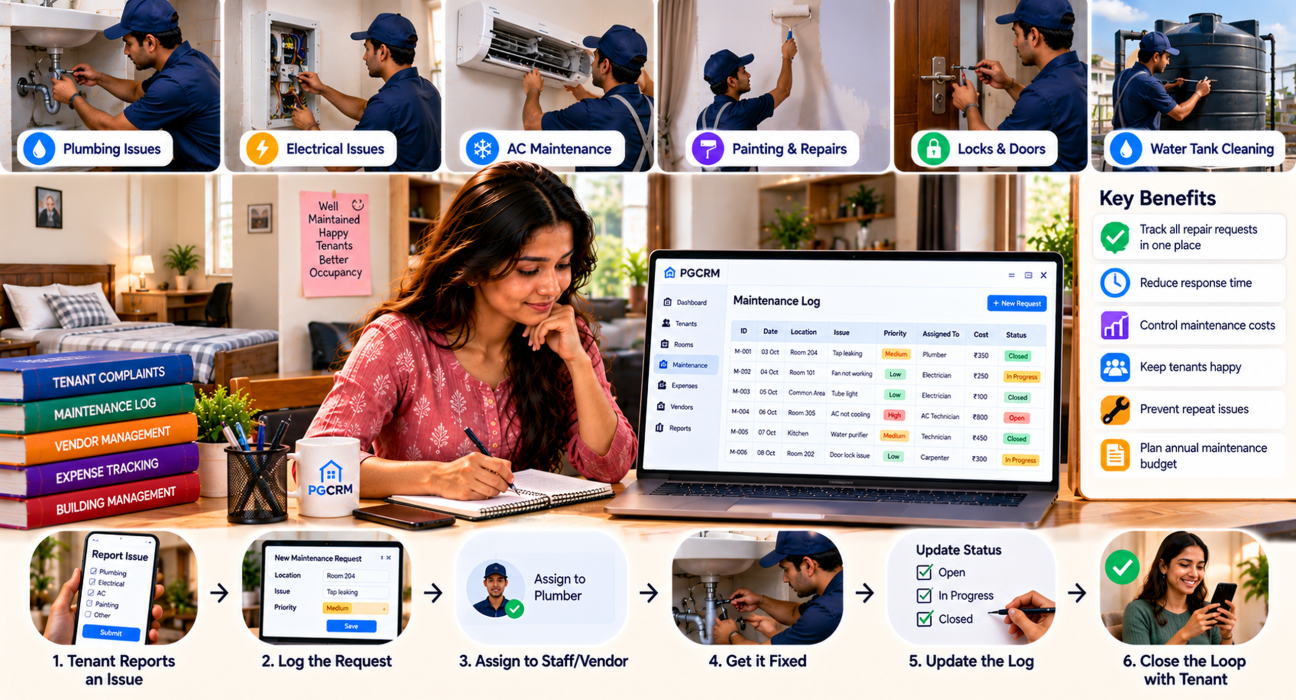
A PG maintenance log is how you stop that cycle. It’s a simple record of every repair request and every routine check, from the day it’s reported to the day it’s closed. This guide shows you what to include, how to set one up in six steps, and how to use it to spot problems early. You can start with a notebook or a spreadsheet, and PG and hostel management software can take over once the volume grows.
What Is a PG Maintenance Log?
A PG maintenance log is a running record of repairs, complaints and routine upkeep in your PG. Each entry notes what went wrong, where, who is fixing it, what it cost and when it was closed. It gives owners and managers one place to see what is pending, what is done and what keeps breaking.
Think of it as the memory of your building. People forget. A log doesn’t.
Why Every PG Needs One
Even a small PG has plenty to look after: plumbing, wiring, beds, water supply, Wi-Fi, locks. Without a record, a few things go wrong:
- Small issues get forgotten and turn into expensive repairs
- Tenants feel ignored, and unhappy tenants move out
- You can’t tell whether a repair bill is fair or inflated
- Staff and owners blame each other because nothing is written down
- You have no idea which room, appliance or vendor causes the most trouble
A log also helps with your budget. If you’ve read about building an annual financial plan for your PG, you’ll know repairs are the line item most owners underestimate. A year of logged repairs gives you a real number to plan with.
What to Include in a PG Maintenance Log
Keep it simple. A log nobody fills in is worse than no log at all. These are the fields that earn their place:
- Issue ID: a short running number, like M-001
- Date reported: when someone first told you
- Location: building, floor and room (or common area)
- Issue description: one clear line, such as “Geyser not heating”
- Reported by: tenant name or staff member
- Priority: high, medium or low
- Assigned to: caretaker, plumber, electrician, carpenter
- Cost: what you paid, even if it’s ₹0
- Status: open, in progress or closed
- Date closed: so you can see how long things really take
That’s ten columns. If it feels like too many at first, start with date, room, issue, status and cost. Add the rest once the habit sticks.
How to Create a PG Maintenance Log, Step by Step
Step 1: Choose Your Format
You have three realistic options.
- A bound notebook: cheap and easy, but hard to search, and it only lives in one place.
- A spreadsheet: searchable, shareable and easy to total up costs. A solid choice for a single small PG.
- PG management software: better once you have several buildings, more staff or a lot of complaints.
Pick the one your caretaker will actually use. The best format is the one that gets filled in every day.
Step 2: Set Up Your Columns
Use the fields listed above. If you’re using a spreadsheet, freeze the top row and add a filter so you can quickly view only open issues.
One small tip: use a drop-down for Status and Priority. Typing “Pending” in one row and “pending.” in another makes the data messy later.
Step 3: Give Every Issue a Priority
Not every problem is equally urgent. A leaking pipe near a socket is not the same as a chipped paint patch. Decide your rules once so nobody has to guess.
| Priority | What it covers | Suggested target |
|---|---|---|
| High | Safety risks, no water, no power, broken locks | Same day |
| Medium | Affects comfort: fan, geyser, Wi-Fi, leaking tap | 2–3 days |
| Low | Cosmetic or minor: paint, loose handle, small fixes | 1–2 weeks |
Those targets are only a starting point. Adjust them to your building, your vendors and your tenants’ expectations.
Step 4: Decide Who Logs and Who Fixes
Be clear about roles. Usually it works like this:
- Tenants report problems to the caretaker or manager
- The caretaker or manager makes the log entry
- Someone (you, the manager or the caretaker) assigns the job
- The same person updates the status when it’s done
Whoever fixes a problem should not be the only one who can close it. A quick check by the manager, or a word with the tenant, avoids “fixed” entries that aren’t really fixed.
Step 5: Record Costs Every Time
Write down what you paid, including small amounts. Fifty-rupee fixes add up. Note the vendor too. After a few months you’ll see who is reliable and who charges too much.
If you log costs well, your repair budget stops being a guess. You can total it by month, by building or by type of repair.
Step 6: Close the Loop With the Tenant
This step gets skipped most often, and it matters most. When a job is done, tell the tenant. A quick message or a word in the corridor is enough.
Tenants rarely leave because a tap broke. They leave because it stayed broken and nobody told them anything. A log that records “closed” without the tenant knowing is only half useful.
A Sample PG Maintenance Log
Here’s an illustrative example. These entries are made up to show the format.
| ID | Date | Room | Issue | Priority | Fixed by | Cost | Status |
|---|---|---|---|---|---|---|---|
| M-001 | 03 Oct | 204 | Bathroom tap leaking | Medium | Plumber | ₹350 | Closed 04 Oct |
| M-002 | 05 Oct | 101 | Ceiling fan not working | Medium | Electrician | ₹600 | Closed 06 Oct |
| M-003 | 08 Oct | Terrace | Water tank overflowing | High | Caretaker | ₹0 | In progress |
| M-004 | 10 Oct | 303 | Bed frame loose | Low | Carpenter | — | Open |
At a glance you can see what’s open, what’s urgent and what you’ve spent. That’s the whole point.
Don’t Only Log Complaints: Add a Routine Checklist
A log that only records breakdowns keeps you in firefighting mode. Add a short preventive schedule so problems get caught early.
Weekly
- Water tank and motor
- Common-area lights and bulbs
- Bathrooms and drainage
- Kitchen and dining area cleanliness
Monthly
- Geysers, fans and ACs (if you have them)
- Beds, mattresses and cupboards
- Wi-Fi router and connection
- Locks and door latches
Quarterly or yearly
- Wiring and switchboards (ideally by an electrician)
- Pest control
- Painting touch-ups
- Fire safety equipment, if installed. Check local requirements for your property.
Tick these off in the same log. Routine checks and complaint repairs belong together, because they tell one story about the building.
What Your Log Can Tell You
After two or three months, patterns start showing up.
- The same room keeps appearing. There may be a deeper wiring or plumbing problem.
- One appliance fails repeatedly. Replacing it may cost less than fixing it again and again.
- One vendor’s repairs don’t last. Time to find someone else.
- High-priority issues pile up. You may need more staff or faster approval for spending.
- Repair costs jump in certain months. Plan for that dip in your budget.
This is where a log turns from paperwork into a decision-making tool.
Paper vs. Spreadsheet vs. Software
| Notebook | Spreadsheet | PG management software | |
|---|---|---|---|
| Setup effort | Almost none | Low | Low to moderate |
| Searching old entries | Slow | Easy | Easy |
| Works across several buildings | Poor | Possible, but messy | Built for it |
| Cost totals and reports | Manual | Formulas needed | Built-in reports |
| Access from your phone | No | With cloud storage | Yes, with an app |
A notebook is fine for ten beds. By the time you reach multiple floors, buildings or managers, you’ll probably want something more structured.
Where PG Management Software Helps
Keeping a maintenance log in a separate sheet means one more thing to update. Software that already holds your rooms, tenants and expenses can keep it all connected.
PGCRM, for example, includes complaint and maintenance tracking where you can log an issue, set its priority and close it with a clear status trail. It also tracks expenses by category and building, so repair costs don’t get lost, and it lets you give managers their own logins with limited access. You can also see which beds are free, full or under repair, which helps when you’re deciding whether a room can be rented out. You can browse the details on the PGCRM features page.
The software won’t fix a leaking tap, of course. It just makes sure nobody forgets about it.
Common Mistakes to Avoid
- Making the log too complicated. If it takes five minutes per entry, it will be abandoned within a week.
- Logging only big repairs. Small issues reveal patterns.
- Not recording the closing date. Without it, you can’t measure how fast you respond.
- Leaving cost blank. Then you can’t budget.
- Keeping it in the caretaker’s head. If it isn’t written down, it doesn’t exist.
- Never reviewing it. Spend ten minutes each week going through open items.
Frequently Asked Questions
What should a PG maintenance log include?
At minimum: date, room or location, a short issue description, priority, who is fixing it, cost and status. Adding the reporter’s name and the closing date makes the log more useful. Start with a few columns and add more later. A log people actually use beats a detailed one they ignore.
Can I keep a PG maintenance log in Excel or Google Sheets?
Yes, and for a single small PG it works well. Use drop-downs for status and priority, freeze the header row and add a filter for open issues. Google Sheets also lets your manager update it from a phone. As you add buildings or staff, a dedicated system becomes easier to manage.
How often should I update the maintenance log?
Update it the same day an issue is reported, and again whenever its status changes. Don’t batch entries at the end of the week, because details get lost. Review the whole log once a week to catch anything stuck, and look at the bigger patterns once a month.
Who should maintain the log?
Usually the manager or caretaker makes the entries, since they’re closest to the tenants. The owner should review the log regularly, especially the costs and any high-priority items. Decide this clearly in advance. When everyone assumes someone else is handling it, nothing gets recorded.
How do I prioritise maintenance issues in a PG?
Treat safety problems and loss of basics like water, power, and locks as high priority, and fix them the same day. Issues that affect comfort, like fans, geysers and Wi-Fi, are medium. Cosmetic problems are low. Write these rules down so staff apply them consistently.
Why is a maintenance log useful for tenant satisfaction?
Tenants notice when issues get fixed promptly and when someone tells them. A log makes sure no request is forgotten and helps you follow up. It also gives you something to show if a tenant says a problem was never reported, or if you need to explain a delay.
Conclusion
A good PG maintenance log doesn’t need to be fancy. It needs to be simple, consistent and reviewed. Record every issue, set a priority, note the cost and close the loop with the tenant. After a few months, you’ll know your building better than you ever did by memory.
If you’re ready to move beyond notebooks and scattered sheets, tools like PGCRM bring complaints, expenses and room status into one place. Explore PGCRM to simplify your PG and hostel management.