Best CRM for Managing Sales Enquiries and Converting Prospects
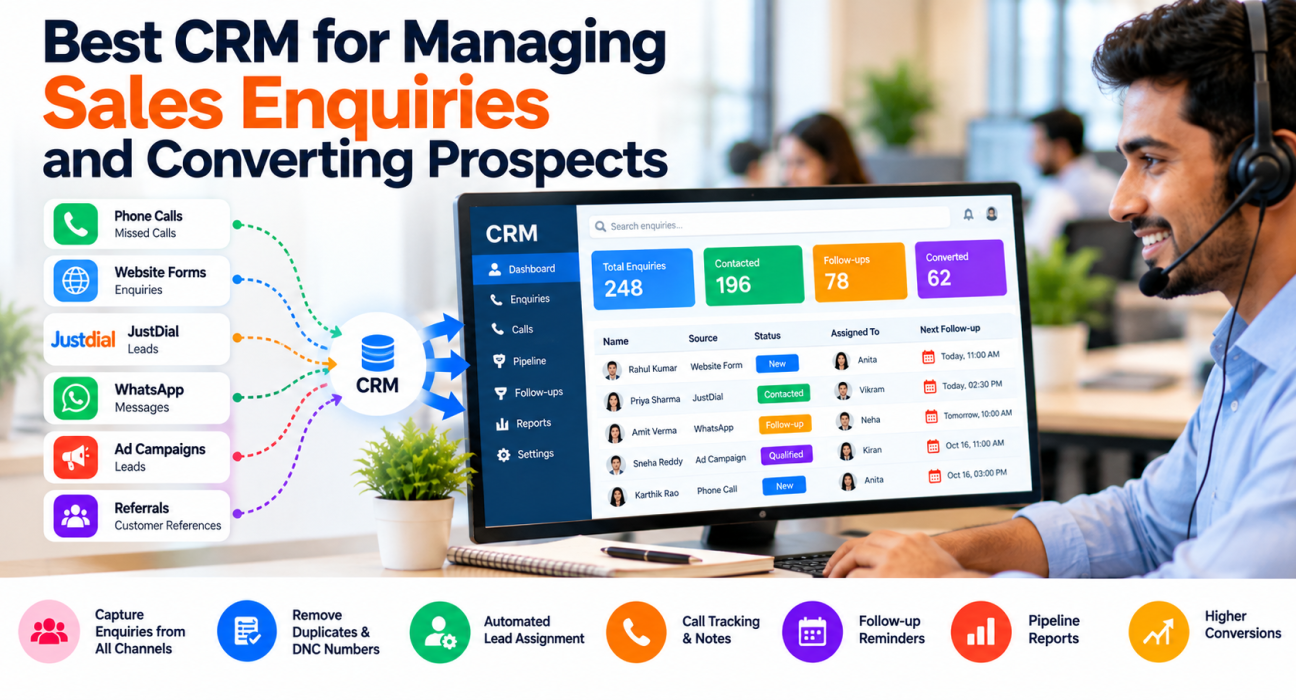
An enquiry arrives through JustDial at 11 AM. Another comes in through your website form. A third is a missed call, and a fourth is a WhatsApp message from a friend of a customer. By evening, nobody is sure who replied to what. This is how enquiries get lost in many small and mid-size sales teams, and it has little to do with how good the product is. Sales enquiry management software brings every enquiry into one place, assigns it, reminds the team to follow up, and shows how many enquiries actually become customers. This guide explains what to look for and how to convert more prospects.
What Is Sales Enquiry Management Software?
Sales enquiry management software captures sales enquiries from every channel, stores them in one record, assigns them to the right salesperson and tracks follow-ups until the prospect buys or drops out. A CRM does this and adds call history, pipeline stages and reports.
It is most useful for teams that receive enquiries from more than one source and follow up by phone, such as real estate, education, insurance, finance and B2B sales teams.
Enquiry, Lead and Prospect: What Is the Difference?
An enquiry is any incoming question or request. A lead is an enquiry that has been recorded for sales follow-up. A prospect is a lead that has been qualified, meaning there is a genuine need and a reason to continue the conversation. Companies use these words differently, so agree on your own definitions and write them down.
What Happens to an Enquiry in a Good CRM
The software should support the whole journey, not just storage. Here is a simple flow to compare tools against:
- Capture. Enquiries from ads, portals, website forms and imported lists land in one pipeline automatically.
- Clean. Duplicates are merged or flagged, and Do Not Call numbers are screened out.
- Assign. The enquiry goes to the right person through rules, not through a manager’s memory.
- Respond. The first call or message happens quickly, with the enquiry details in front of the agent.
- Qualify. The agent records need, budget, timeline and decision maker.
- Follow up. Every call ends with a next step and a date, and reminders do the chasing.
- Close or park. The deal is won, lost with a reason, or parked for a later date.
If a tool handles only step one and then leaves you with a list, it is a database, not an enquiry management system.
Spreadsheet vs Enquiry CRM
| Task | Spreadsheet | CRM |
|---|---|---|
| Capture from many sources | Manual copy-paste | Automatic through integrations |
| Assign enquiries | Manager decides each time | Rule-based |
| Remember follow-ups | Depends on the agent | Reminders and overdue alerts |
| See call history | Scattered notes | One timeline per lead |
| Track conversions | Manual counting | Reports by stage, source and agent |
Spreadsheets are fine for a team of one or two. They start failing as soon as several people touch the same list.
Features to Look For
Multi-source capture. Check that the tool connects with the channels you actually use, and ask what happens when a source is not supported. Manual import should still be easy.
Duplicate and DNC handling. Two agents calling the same prospect looks careless. Calling a number on the Do Not Call list can cause compliance trouble.
Assignment rules. Round-robin, language matching and fixed owners cover most teams. Better still if the system assigns only to agents who are on shift.
Qualification fields and scoring. Custom fields let you record what matters for your business. Scoring or priority tags help agents call the hottest enquiries first.
Call tracking and notes. Since most enquiries are converted on the phone, call duration, outcome and notes should be saved without much typing. This is where a telecaller CRM differs from a general-purpose tool.
Follow-up management. Look for one-tap scheduling, reminders, overdue lists and some way for managers to see missed follow-ups.
Pipeline and reports. You need to see where enquiries stall and which sources convert, not just how many calls were made.
Messaging. WhatsApp, SMS and email templates save time on routine replies, provided they show on the lead’s record.
How to Convert More Enquiries into Prospects and Customers
Software helps, but conversion still depends on habits. These are the ones that tend to matter most.
Respond quickly, and say why you are calling. A prospect who enquired an hour ago remembers it. One who enquired three days ago may not. Start the call by referring to what they asked about.
Qualify early, and keep it short. Three or four questions are usually enough: what do they need, by when, what is their budget range, and who else decides. Record the answers in the CRM, not in a notebook.
End every call with a next step. “I will send the brochure today and call you Thursday at 5 PM” is a next step. “I will get back to you” is not. Log it and set the reminder.
Prioritise by interest, not by order of arrival. A prospect who asked for a price today deserves a call before one who downloaded a brochure last week.
Send useful information, not generic messages. A WhatsApp message with the specific quote or fee details moves a conversation forward more than a general reminder.
Record the reason for every lost enquiry. After a month, these reasons show whether you have a price problem, a timing problem or a follow-up problem.
Three Hypothetical Examples
These are made-up scenarios to show how the process works.
Real estate. A buyer enquires about a 2BHK through a property portal. The CRM assigns the enquiry, the agent records budget and location, and a site visit follow-up is set for the weekend. See the real estate CRM page for related workflows.
Education. A coaching centre gets enquiries for different courses. Counsellors tag each enquiry by course and parent concern, and the system reminds them to call before the batch deadline. The education CRM page covers this use case.
B2B sales. A manufacturer receives a quote request through a trade portal. The enquiry is assigned, the agent confirms quantity and delivery timeline, and the quote follow-up is scheduled. See the B2B CRM page.
Metrics Worth Tracking
You do not need dozens of reports. These six tell most of the story:
- Time from enquiry to first call
- Percentage of enquiries contacted
- Percentage of contacted enquiries that become qualified prospects
- Follow-ups completed on time
- Drop-off by pipeline stage
- Conversion by source
Review them weekly with the team, and look for one fix at a time.
Common Mistakes to Avoid
- Treating all enquiries equally. Some need an immediate call, others a gentler follow-up.
- Skipping qualification. Agents then spend time on prospects who were never going to buy.
- Too many pipeline stages. Five or six clear stages work better than fifteen unclear ones.
- No ownership. An enquiry that belongs to “the team” belongs to nobody.
- Choosing only on price. Check which features are locked, and compare plans honestly. This guide on how to choose the best telecalling CRM for your business can help.
- Never reviewing lost reasons. They are free market research.
How TeleCalling CRM Can Help
TeleCalling CRM is built for outbound telecalling teams in India. According to its website, these features relate to enquiry handling:
- Capture: Integrations with Facebook and Instagram Lead Ads, Google Ads, 99acres, Housing.com, MagicBricks, JustDial, Sulekha, TradeIndia, WordPress, Wix and Google Sheets, plus custom web forms and CSV or Excel import. See the integration guides.
- Cleaning and assignment: De-duplication, DNC checks and rule-based assignment (round-robin, language-match or fixed agent).
- Qualification and priority: Custom fields, tags, and Hot, Warm and Cold scoring.
- Calling: An auto dialer, call notes, call scripts and call history on each lead.
- Follow-ups: One-tap scheduling, reminders and overdue alerts.
- Pipeline: Custom stages, deal values and stage-change history.
- Reports: Conversion funnel, source performance and agent comparison.
- Messaging: WhatsApp, SMS and email on one lead timeline.
The site mentions a free 3-day trial and says all features are included in every plan, but please confirm current plans and limits on the pricing page. Because it is built for outbound calling, check the fit if your enquiries are mostly inbound calls that need queue routing.
Frequently Asked Questions
What is sales enquiry management software?
It is software that captures sales enquiries from different channels, stores them in one place, assigns them to salespeople and tracks follow-ups until the prospect converts. A CRM usually adds call history, pipeline stages and reports on top of this.
What is the best CRM for managing sales enquiries?
The best choice depends on your team. Look for multi-source capture, automatic assignment, follow-up reminders, call tracking and conversion reports. Test two or three tools with real enquiries before deciding, and check how pricing changes as your team grows.
How do I convert enquiries into customers?
Respond quickly, qualify with a few questions, end every call with a dated next step and follow up consistently. Prioritise enquiries showing buying interest, and record why enquiries are lost so you can fix recurring problems.
What is the difference between an enquiry and a lead?
An enquiry is any incoming request. A lead is an enquiry recorded for sales follow-up. Some companies use the terms interchangeably, so it helps to define them clearly for your team and your reports.
How fast should we respond to a new enquiry?
There is no single rule, but faster is generally better, especially for enquiries that request prices or visits. Set a target such as “same working hour”, measure it weekly, and adjust it based on what your team can sustain.
Can a CRM manage enquiries from portals, ads and website forms?
Many can, but supported sources differ between products. Check the vendor’s integration list for the portals and ad platforms you use, and ask how unsupported sources are handled, for example through CSV import.
Do small businesses need enquiry management software?
If one person handles all enquiries, a spreadsheet may be enough. Once two or more people follow up on the same enquiries, or enquiries come from several sources, a CRM prevents duplicates and missed follow-ups.
Conclusion
Converting more prospects usually does not need a bigger marketing budget. It needs a reliable way to capture each enquiry, call it quickly, qualify it properly and follow up on time. Start with your own process, decide what must happen at each stage, and pick a tool that enforces it. If you want to see how lead management software fits your own enquiry sources and team, you can request a demo and compare it with your current setup.