Best CRM for Managing Customer Interactions Across Multiple Channels
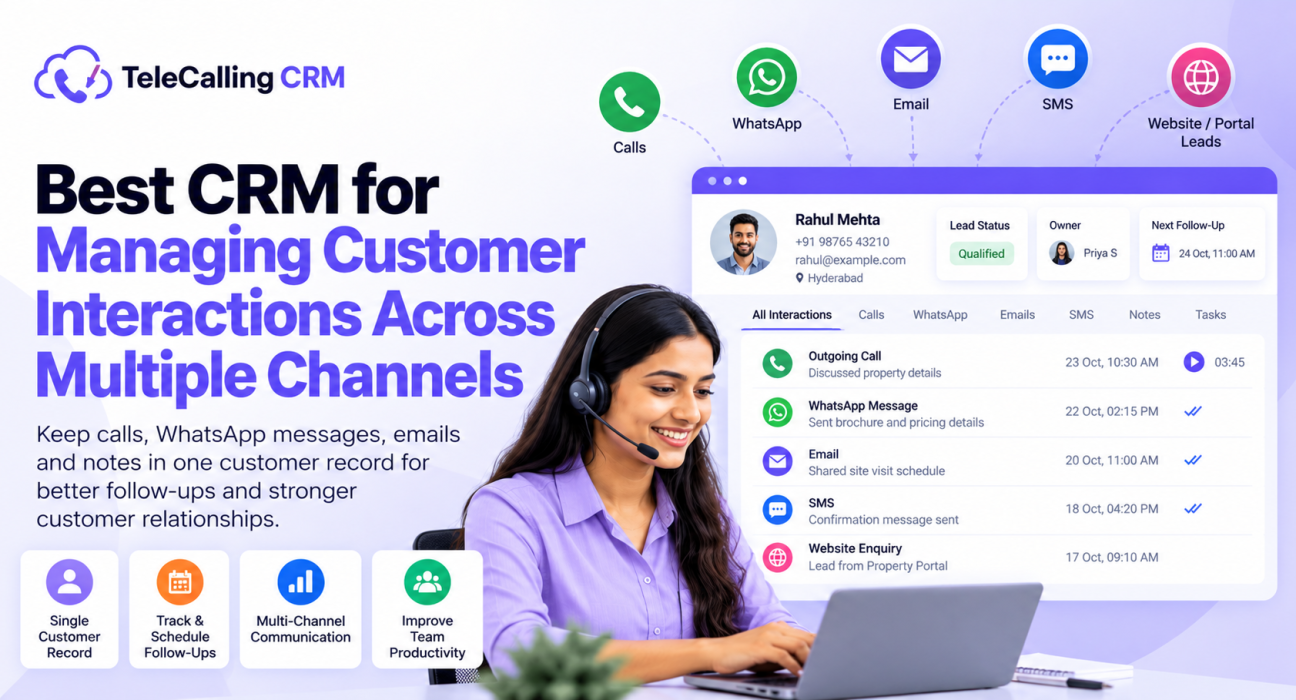
A customer enquires on a property portal, gets a call on Monday, receives a WhatsApp message on Tuesday and replies by email on Thursday. If each of these sits in a different tool, the next person who speaks to that customer starts from zero. This is the problem that customer interaction management software for sales teams is meant to solve.
In simple terms, it is a CRM that keeps calls, messages, notes and next steps in one customer record. This guide explains what to look for, how different types of tools compare and how to choose one that fits your team.
What Is Customer Interaction Management Software?
Customer interaction management software records and organises every conversation a business has with a customer, across calls, messages and email, in one place. It gives teams a shared history, so any employee can see what was said, what was promised and what should happen next.
The term overlaps with CRM, helpdesk and contact centre software. Sales-led businesses usually need this inside a CRM. Support-led businesses often need a helpdesk with ticketing. Knowing which one you are will save you a lot of time when comparing tools.
Why Multichannel Interactions Get Messy
Most teams do not plan to use five tools. It happens gradually. Common signs include:
- Leads are saved in Excel, while WhatsApp chats stay on personal phones.
- Call notes are written in a notebook or not written at all.
- Two agents contact the same customer on the same day.
- A promised callback is forgotten because it was never scheduled.
- When an agent leaves, the customer history leaves with them.
- Managers cannot see the full picture without asking each person.
These are not discipline problems. They are system problems, and a well-chosen CRM can reduce most of them.
What Is the Best CRM for Managing Customer Interactions Across Channels?
The best CRM for multichannel customer interactions keeps one record per customer, logs calls and messages with minimal manual entry, shows the full history to every team member and schedules follow-ups across channels. The right choice depends on whether your team is mainly sales-led or support-led.
Here are the capabilities that matter most:
| Capability | Why it matters | What to ask a vendor |
|---|---|---|
| Single customer record | Prevents duplicate contacts and repeated questions | How are duplicates handled? |
| Call logging | Keeps duration, outcome, recordings and notes together | Is logging automatic or manual? |
| Messaging channels | Lets agents follow up on the channel the customer prefers | Which channels are built in, and which need add-ons? |
| Lead capture | Brings enquiries from ads, portals and forms into one place | Which lead sources connect directly? |
| Follow-up scheduling | Stops promised callbacks from being forgotten | Are there reminders and overdue alerts? |
| Lead assignment and permissions | Gives every lead an owner and protects data | Can access be controlled by role? |
| Reporting | Shows activity by agent, channel and stage | Can reports be exported or scheduled? |
Sales-Led vs Support-Led Tools: Know the Difference
“Multichannel” means different things to different vendors. Before comparing features, decide which type of tool you actually need.
| Tool type | Best for | Typical strengths | Watch out for |
|---|---|---|---|
| Sales or telecalling CRM | Outbound calling and lead follow-up | Dialer, lead assignment, follow-ups, pipeline | May not include ticketing or live chat |
| Helpdesk or support platform | Inbound customer support | Ticketing, SLAs, knowledge base | Usually lighter on outbound calling and sales pipeline |
| Large contact centre suite | Big inbound and outbound operations | Routing, IVR, workforce management | Higher cost and longer setup |
If most of your work is calling leads and following up on WhatsApp, SMS or email, a sales-focused CRM is usually the closer fit. If most of your work is resolving support tickets, a helpdesk is likely better.
How to Choose a CRM for Multichannel Interactions
Use this simple process when shortlisting.
- List the channels you actually use. Include calls, WhatsApp, SMS, email and any lead sources such as ads or property portals. Ignore channels you do not plan to use.
- Decide your primary use case. Is it lead follow-up, customer support, renewals or a mix? This tells you which tool type to look at.
- Check how customer records are built. Look for lead import, de-duplication and custom fields, so records stay clean as the data grows.
- Test the daily workflow with your agents. If logging a call takes too many clicks, your team will skip it. Ask two or three agents to try it.
- Review reporting and access control. Managers need to see activity by agent and stage. Role-based access keeps sensitive data limited to the right people.
- Run a trial with real leads. Import a small list, make real calls and send real follow-ups. A trial reveals problems that a demo hides.
For a broader buying framework, you can also read this guide on how to choose the best telecalling CRM.
Practical Examples
These are hypothetical examples to show how multichannel tracking helps in different settings.
Real estate: A buyer enquires through a property portal. The agent calls, then sends brochure details on WhatsApp and schedules a site-visit reminder. When a colleague covers the next day, the full history is already in the lead record. Teams in this space can look at the Real Estate CRM page for more context.
Education: A parent asks about admission on a website form. The counsellor calls, notes the course interest and sends fee details over email. When the parent calls back later, any counsellor can see the previous conversation. See the Education CRM page for similar use cases.
Insurance: An agent calls a customer about a renewal, who asks for a quote on WhatsApp. A scheduled callback ensures the renewal is not missed, and notes from the earlier call avoid repeated questions.
Common Mistakes to Avoid
- Buying for channels you do not use. A long channel list sounds impressive but adds cost and complexity.
- Confusing a CRM with a helpdesk. Each solves a different problem. Pick based on your main workflow.
- Skipping agent input. Tools that agents find slow or confusing end up with incomplete data.
- Ignoring data quality. Duplicates and missing outcomes weaken every report.
- Not setting rules for channel use. Decide when to call, when to message and how often to follow up, so customers are not over-contacted.
- Overlooking compliance. Messaging and calling rules apply in India, including DND and DLT requirements for SMS. Check with your provider and legal adviser.
How TeleCallingCRM Can Help
TeleCallingCRM is a telecalling CRM designed for outbound sales teams in India. According to its website, it supports several parts of multichannel interaction management:
- Calls: an auto dialer with call tracking, including duration, outcome, recording and notes
- WhatsApp: message templates that agents can send in one tap from the mobile app
- SMS and email: SMS through MSG91 with DLT support, and email through your own SMTP
- Unified inbox and bulk messaging: messages can be sent in bulk and scheduled
- Lead capture: integrations with Facebook and Instagram Lead Ads, Google Ads, 99acres, Housing, MagicBricks, JustDial, Sulekha, TradeIndia, WordPress, Wix and Google Sheets
- Follow-ups and automation: scheduled callbacks, reminders, overdue alerts and automated workflows
- Insight: AI call analysis, dashboards, leaderboards and custom reports
An important limitation: the website describes a sales-focused CRM. It does not describe live chat, social media inbox or support ticketing. If your main need is a support helpdesk, you may need a different tool, or a combination of tools.
Larger teams can also check the Call Center CRM page and the pricing page for plan details.
Frequently Asked Questions
What is customer interaction management software?
It is software that stores and organises all communication between a business and its customers, such as calls, messages and emails, in one place. It gives every team member access to the same history, so conversations continue smoothly instead of restarting each time.
Is customer interaction management the same as CRM?
Not exactly. A CRM stores customer and lead data, and many CRMs include interaction tracking. Customer interaction management focuses on the conversations themselves across channels. For many sales teams, a CRM with call logging, messaging and follow-ups covers both needs.
Which channels should a multichannel CRM support?
It should support the channels your customers actually use. For most Indian sales teams, that means phone calls, WhatsApp, SMS and email, plus lead sources such as ads and listing portals. Add chat or social media only if customers genuinely use them to reach you.
Do small businesses need a multichannel CRM?
If a small team already uses calls, WhatsApp and Excel together, a CRM can help keep records in one place. A very small team with a handful of customers may manage without one, but problems usually appear as lead volume grows.
How is a telecalling CRM different from a helpdesk?
A telecalling CRM is built for outbound work: dialing, lead assignment, follow-ups and sales pipeline. A helpdesk is built for inbound support: tickets, service-level targets and a knowledge base. Choose based on whether your team mainly sells or mainly resolves issues.
What should I check about compliance before using calling and messaging tools?
Check how the tool handles Do Not Call lists, SMS registration requirements, call recording consent and data security. Rules vary by business and sector. This is general information, not legal advice, so confirm requirements with a qualified professional.
Conclusion
Managing customer interactions across channels is less about having many tools and more about having one reliable record. Decide whether your team is sales-led or support-led, list the channels you truly use and test the daily workflow with your agents before committing.
If your team is focused on calling and follow-up, you can see how lead follow-up software for calls, WhatsApp, SMS and email works in TeleCallingCRM and judge whether it suits your process.