Best Sales Pipeline Software for Small Businesses
A small business owner tracking leads on WhatsApp, a notebook and a shared Excel sheet will eventually lose a deal — not because the product was wrong, but because nobody followed up on time. This is the most common reason small sales teams plateau: leads exist, but nobody can see where each one stands.
Sales pipeline software fixes this by giving every lead a visible stage, from first contact to closed deal. For small businesses running outbound calls, this works best when it’s connected to your calling process, not sitting as a separate tool your team has to update manually — which is where a sales pipeline software built around your calling workflow makes the daily follow-up routine far easier to manage.
This guide explains what sales pipeline software actually does, what small businesses should look for, and how to avoid the mistakes that make teams abandon these tools within a few months.
What Is Sales Pipeline Software?
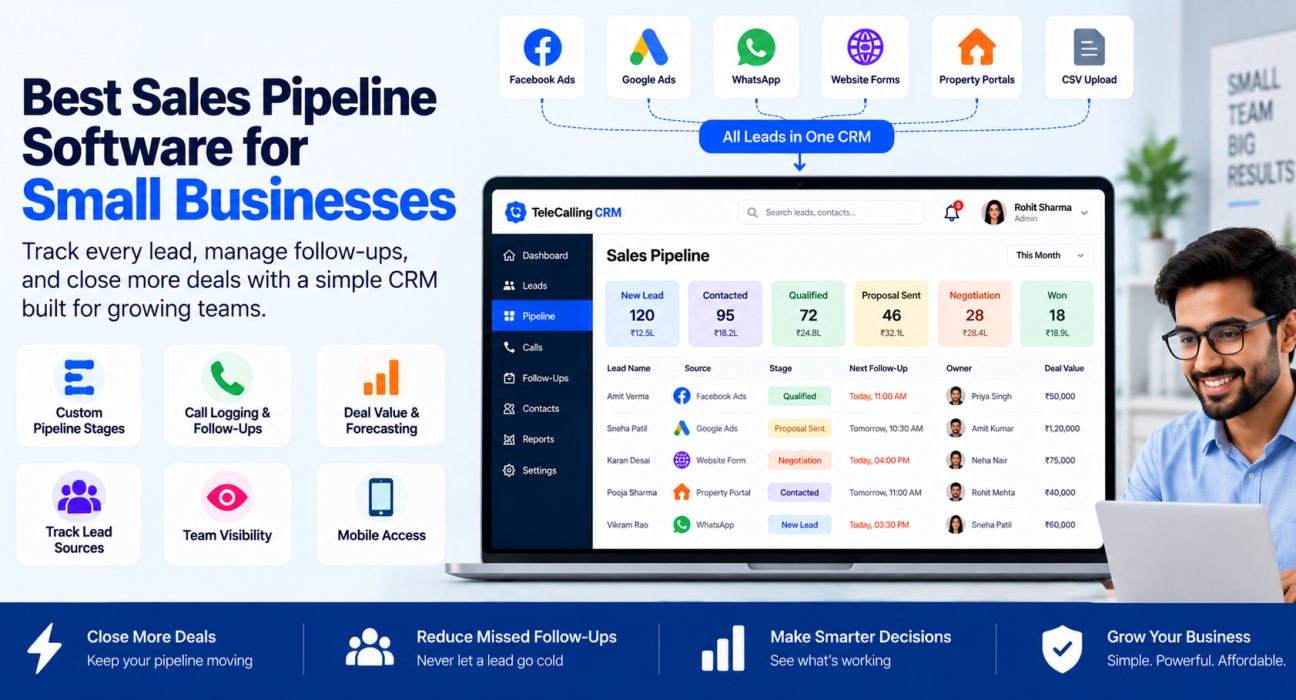
Sales pipeline software is a tool that shows every open deal as a card or row moving through stages — usually something like New Lead, Contacted, Qualified, Proposal Sent, Negotiation and Won/Lost. Each stage tells you exactly where a prospect stands and what needs to happen next.
For a small business, this replaces the guesswork of “did we call this person back?” with a clear, shared view that the whole team can see and update.
Why Small Businesses Need a Sales Pipeline (Not Just a Spreadsheet)
Spreadsheets work fine when you have ten leads. They fall apart at fifty, and completely break at a few hundred — especially when more than one person is calling the same list.
Common problems small teams face without proper pipeline software:
- Leads sit untouched because nobody owns the follow-up
- Two telecallers call the same customer, causing confusion
- Deal value and expected revenue exist only in someone’s head
- Managers have no way to see which stage most deals get stuck at
- Hot leads go cold simply because a callback was forgotten
A sales pipeline tool solves these by making stage, ownership and next action visible to everyone, not just the person who “remembers.”
What to Look For in Sales Pipeline Software
Not every CRM or pipeline tool is built the same way. Small businesses, especially those doing high call volumes, should evaluate software against these criteria.
1. Custom Pipeline Stages
Every business sells differently. A real estate team’s stages look different from an insurance agency’s. Good software lets you define your own stages instead of forcing a generic template.
2. Deal Value and Forecasting
Knowing how many leads are “in the pipeline” is not enough. You need to see the rupee value sitting at each stage and a realistic forecast of what’s likely to close this month or quarter, based on stage-wise win probability.
3. Calling and Follow-up Built In
For sales teams that work primarily by phone, a pipeline tool that’s disconnected from the actual calling process creates double work — an agent calls from one app and updates the deal in another. Pipeline software that includes call logging, follow-up reminders and stage updates from the same screen keeps agents focused on calling instead of admin work.
4. Lead Source Tracking
Small businesses usually pull leads from multiple places — Facebook ads, Google Ads, property portals, referrals, walk-ins. Pipeline software should tell you which source is actually converting, not just which one generates volume.
5. Team Visibility Without Micromanagement
Managers need a real-time view of which agent is working which stage, without having to ask for a status update every evening. A shared dashboard removes this back-and-forth entirely.
6. Mobile Access
Many small business sales teams — especially field agents, real estate consultants and insurance agents — are not sitting at a desk. Mobile access to the pipeline and follow-up list matters as much as the desktop dashboard.
7. Simple Pricing That Scales With Team Size
Small businesses are price-sensitive, and per-user pricing can quietly become expensive as the team grows. Flat, predictable pricing is easier to budget around.
How a Sales Pipeline Actually Works: A Simple Example
Here is a hypothetical example to illustrate the flow. A small loan DSA (direct selling agent) business receives 40 leads a day from Facebook Ads and Google Ads.
- Leads land automatically in the pipeline as “New”
- Each lead is auto-assigned to an available telecaller
- The telecaller calls, logs the outcome, and moves the lead to “Contacted” or “Not Interested”
- Interested leads move to “Qualified,” with a follow-up date set
- As documents are shared and terms discussed, the lead moves to “Proposal Sent” and “Negotiation”
- Once approved, the lead is marked “Won,” with the deal value recorded
At any point, the sales manager can see how many leads are stuck at “Qualified” for more than three days — a clear sign that follow-ups are slipping.
Sales Pipeline Software vs. Lead Management Software
These terms are often used interchangeably, but they solve slightly different problems.
| Aspect | Sales Pipeline Software | Lead Management Software |
|---|---|---|
| Main focus | Deal progression and revenue forecasting | Lead capture, assignment and follow-up |
| Best for | Tracking deals through stages to close | Organising and distributing incoming leads |
| Typical view | Stage-wise board with deal value | List of leads with status and owner |
| Common users | Sales managers tracking revenue | Telecallers working through call lists |
In practice, small businesses get the most value from a platform that combines both — lead capture and distribution feeding directly into a visible pipeline — rather than running two separate tools.
Common Mistakes Small Businesses Make With Pipeline Software
Adding too many stages. A pipeline with twelve stages confuses agents and slows down updates. Five to seven stages are usually enough for most small businesses.
Not tracking lead source. Without this, you can’t tell whether your Facebook Ads spend or your Google Ads spend is actually producing paying customers.
Treating the pipeline as a reporting tool only. If agents see it as extra data-entry work rather than something that helps them close deals faster, they’ll stop updating it. The tool should make their daily follow-up job easier, not harder.
Ignoring stuck deals. A pipeline is only useful if someone reviews it regularly to spot leads that haven’t moved in days and need a nudge.
Choosing a tool built for large enterprises. Complex enterprise CRMs often have far more configuration than a five- or ten-person team needs, which slows down adoption.
How TeleCallingCRM Can Help
TeleCallingCRM combines a sales pipeline with the calling workflow, so small business teams don’t have to switch between a dialer and a separate pipeline tool. Leads move through custom pipeline stages, with deal value, expected close date and stage-change history tracked automatically as agents make calls and log outcomes.
Leads from sources like Facebook and Instagram Lead Ads, Google Ads, property portals such as 99acres, Housing and MagicBricks, and channels like JustDial and Google Sheets can be pulled into the pipeline automatically, so nothing needs to be added by hand. Managers get a live dashboard showing pipeline value by stage and by agent, along with weighted revenue forecasts for the month and quarter. For small businesses that call leads by phone, this keeps the pipeline updated as a natural part of the calling process rather than a separate reporting task. You can see how this fits together on the features page.
Frequently Asked Questions
What is the difference between sales pipeline software and a CRM?
A CRM is a broader system for managing all customer relationships, including support and communication history. Sales pipeline software is usually one part of a CRM, focused specifically on tracking deals as they move toward closing.
Is sales pipeline software useful for a small team of 3–5 people?
Yes. Even small teams lose track of leads without a shared, visible pipeline. The benefit becomes clearer as soon as more than one person is following up with customers.
Can sales pipeline software work with phone-based sales teams?
Yes, provided the software includes calling and follow-up features. Tools that combine dialing with pipeline tracking reduce the need to switch between apps during a call.
How many pipeline stages should a small business use?
Most small businesses do well with five to seven stages. Too many stages slow down updates and confuse the team.
Does sales pipeline software replace lead management software?
Not always, but the best pipeline tools include lead capture and distribution as part of the same platform, removing the need for two separate systems.
Is pipeline software only useful for B2B sales?
No. Real estate, education, insurance, healthcare and other consumer-facing businesses that follow up with prospects over multiple calls also benefit from a visible pipeline.
How do I know if my team needs pipeline software instead of a spreadsheet?
If leads are being missed, if two people are calling the same customer, or if you can’t say how much revenue is expected this month without asking around, it’s time to move off spreadsheets.
Conclusion
Sales pipeline software gives small businesses something a spreadsheet never can — a shared, real-time view of every deal, who owns it, and what happens next. For teams that sell over the phone, the biggest gains come from choosing a sales calling software that keeps the pipeline updated automatically as agents call, rather than adding pipeline management as one more manual task at the end of the day.