Introduction
Running one PG is manageable with a notebook and a good memory. Add a second or third property, and that same approach starts to break – tenant details blur together, rent status becomes hard to verify across buildings, and knowing which rooms are vacant where requires calling different managers. Learning how to manage multiple PG properties without losing track means moving beyond memory-based systems and building a structure that scales.
This guide covers the specific challenges that show up once you’re running more than one property, and how PG and hostel management software can help keep tenants, rent, and occupancy organised across every building you own.
Why Managing Multiple PG Properties Is Different
Managing one PG and managing several isn’t just “more of the same work”; it introduces problems that don’t exist at a single-property scale. A method that works fine for 15 tenants in one building often falls apart once you’re coordinating three properties, multiple managers, and tenants who expect the same level of responsiveness regardless of location.
The Problems That Appear With Scale
- Information stops living in one place. Each property tends to develop its own register, spreadsheet, or habit, making it hard to get a combined view.
- On-site managers operate independently. Without a shared system, a manager at Property A has no visibility into what’s happening at Property B, and neither does the owner unless they physically check or call.
- Rent status becomes harder to verify. Confirming which tenants across three properties have paid this month means checking three separate records instead of one.
- Occupancy comparisons get difficult. Knowing which property has vacant beds right now – information you need before quoting a new tenant – requires real-time visibility, not a phone call.
- Reporting takes far longer. Compiling monthly numbers across properties from separate spreadsheets is slow and prone to errors.
Single Property vs. Multiple Properties
| Aspect | Single PG | Multiple PG Properties |
|---|---|---|
| Tenant tracking | Manageable manually or in one sheet | Needs a system that separates and connects properties |
| Rent verification | Check one register | Check multiple records unless centralised |
| Occupancy visibility | Usually known from memory | Requires real-time tracking across locations |
| Staff coordination | Direct, owner is usually on-site | Needs shared records across managers |
| Reporting | Simple to compile | Time-consuming without a centralised system |
How to Manage Multiple PG Properties Without Losing Track
Managing several properties well comes down to four practices: centralising data, standardising processes, giving staff the right visibility, and reviewing performance property by property.
1. Centralise Property, Tenant, and Rent Data
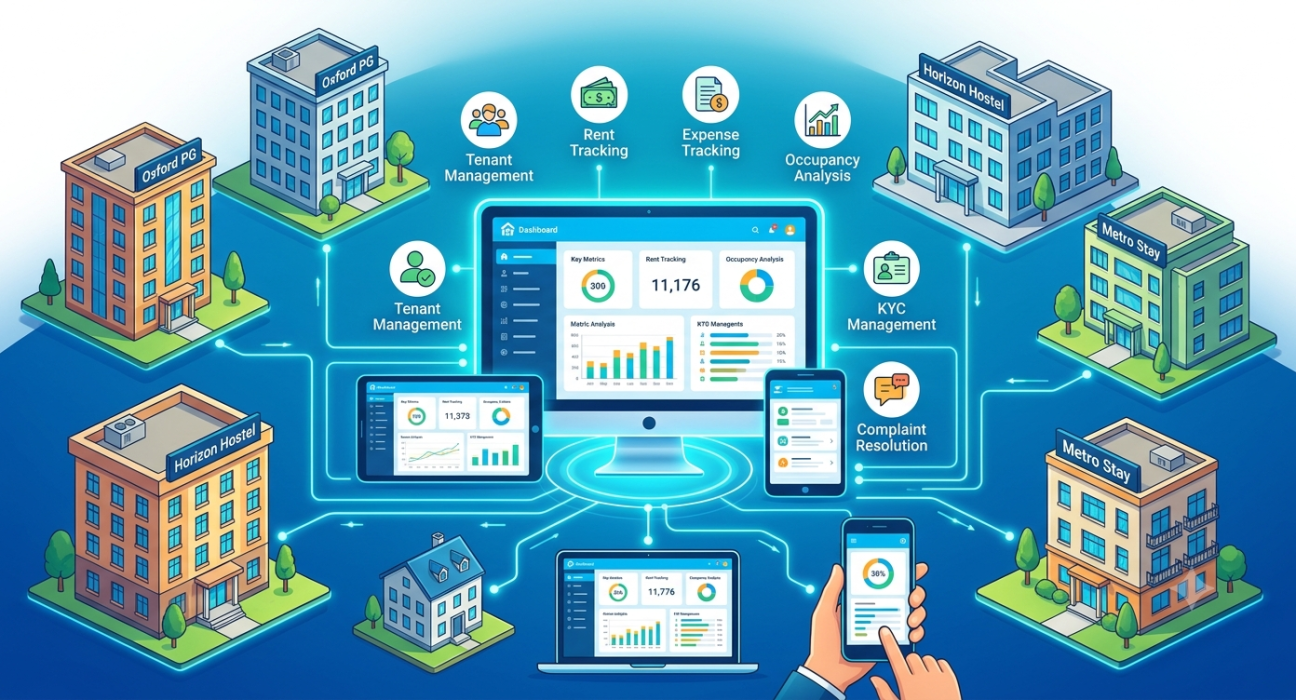
The biggest shift when moving from one property to several is treating all of them as part of one connected system rather than separate mini-businesses. Every property should feed into the same structure – buildings, rooms, beds, tenants, and rent — so you can view them individually or together.
This matters because decisions like “which property has the most vacancies right now” or “which tenant across all properties has overdue rent” become simple lookups instead of a round of phone calls.
2. Standardise How Each Property Operates
When properties run differently – one tracks rent in a register, another in an app, a third informally – comparing them becomes difficult, and training new staff takes longer. Standardising the process across properties means:
- The same fields get recorded for every tenant (contact, ID/KYC, room, rent, due date)
- Rent gets logged the same way regardless of property
- Complaints and maintenance follow the same reporting structure
- Reports use the same categories across all locations
3. Give On-Site Managers the Right Level of Access
Managers need visibility into their own property’s day-to-day details – occupancy, tenant status, complaints – without necessarily needing full access to every other property’s financial data. A system that lets managers see and update what’s relevant to their location keeps information accurate at the source, since the person closest to the day-to-day activity is the one entering it.
4. Review Performance Property by Property
Once data is centralised, compare properties against each other regularly:
- Check occupancy rates across all properties side by side
- Compare rent collection consistency – which properties have more overdue payments
- Review expense patterns to spot which property costs more to run relative to its size
- Identify which property needs attention before it becomes a bigger issue
This kind of comparison is difficult to do accurately with separate spreadsheets per property, but straightforward once everything sits in one system.
Common Mistakes When Scaling to Multiple PG Properties
Owners who expand from one property to several often repeat a handful of avoidable patterns, usually because the systems that worked for a single PG simply get stretched across more locations instead of being rebuilt to handle the added complexity.
- Adding a second property before systemising the first. If the first PG’s processes are already inconsistent, that inconsistency multiplies rather than resolves itself with scale.
- Letting each manager set up their own tracking method. This creates the exact fragmentation that makes multi-property management hard to oversee.
- Checking properties reactively instead of proactively. Waiting for a complaint or a rent shortfall to surface a problem means the issue has already been building for a while.
- Underestimating the reporting burden. Owners often realise too late how much time monthly reconciliation across properties takes without a centralised system.
How PGCRM Supports Managing Multiple PG Properties
PGCRM allows owners to add and manage multiple properties within a single account, keeping buildings, rooms, tenants, and rent data organised by property while still giving a combined view when needed. Using PG management software such as PGCRM can help owners standardise how each property tracks tenants and rent, giving managers the visibility they need for their own location while keeping owners informed across the entire portfolio.
FAQ
What’s the biggest challenge in managing multiple PG properties?
The biggest challenge is usually fragmented information — each property tends to develop its own tracking habits, making it hard to get a combined, accurate view of tenants, rent, and occupancy across locations. Centralising this data into one system is typically the most effective fix.
How do I keep on-site managers coordinated across different PG properties?
Give each manager access to update and view their own property’s day-to-day details within a shared system, rather than relying on separate spreadsheets or verbal updates. This keeps records accurate at the source while still letting owners see a combined view across all properties.
Should I use the same rent collection process for all my PG properties?
Yes, standardising rent tracking – the same due dates structure, payment logging, and reminder process – across properties makes it much easier to compare performance and spot issues. Inconsistent processes between properties make reporting and oversight significantly harder as you scale.
How can I compare occupancy across multiple PG properties easily?
This requires real-time, centralised tracking rather than checking each property individually. When room and bed data for every property sits in one system, comparing occupancy rates side by side becomes a quick lookup instead of a series of phone calls or site visits.
Is it harder to track rent across multiple PG properties?
It can be, if each property maintains separate records. Without centralised tracking, confirming which tenants across all properties have paid requires checking multiple sources individually. A shared system that logs rent against each tenant, regardless of property, removes this extra step.
When should I consider using software to manage multiple PG properties?
Many owners find manual tracking becomes difficult to sustain once they add a second or third property, since the coordination and reporting burden grows faster than the number of properties. If checking rent, occupancy, or complaints across properties already feels time-consuming, that’s a reasonable signal to centralise.
Conclusion
Managing multiple PG properties without losing track comes down to treating them as one connected system rather than separate operations running side by side. Centralising tenant, rent, and occupancy data, standardising how each property operates, and reviewing performance across locations regularly turns a scattered, reactive process into something owners can actually stay on top of. If keeping tabs on more than one property has started to feel unmanageable, explore PGCRM to see how a PG and hostel management platform can bring all your properties into one organised view.