How to Automate Sales Lead Follow-Ups and Reminders
A lead enquires on Monday. The agent says, “I will call you on Thursday.” By Thursday, forty new leads have arrived, the note is buried in a notebook and nobody calls. The lead buys from someone else.
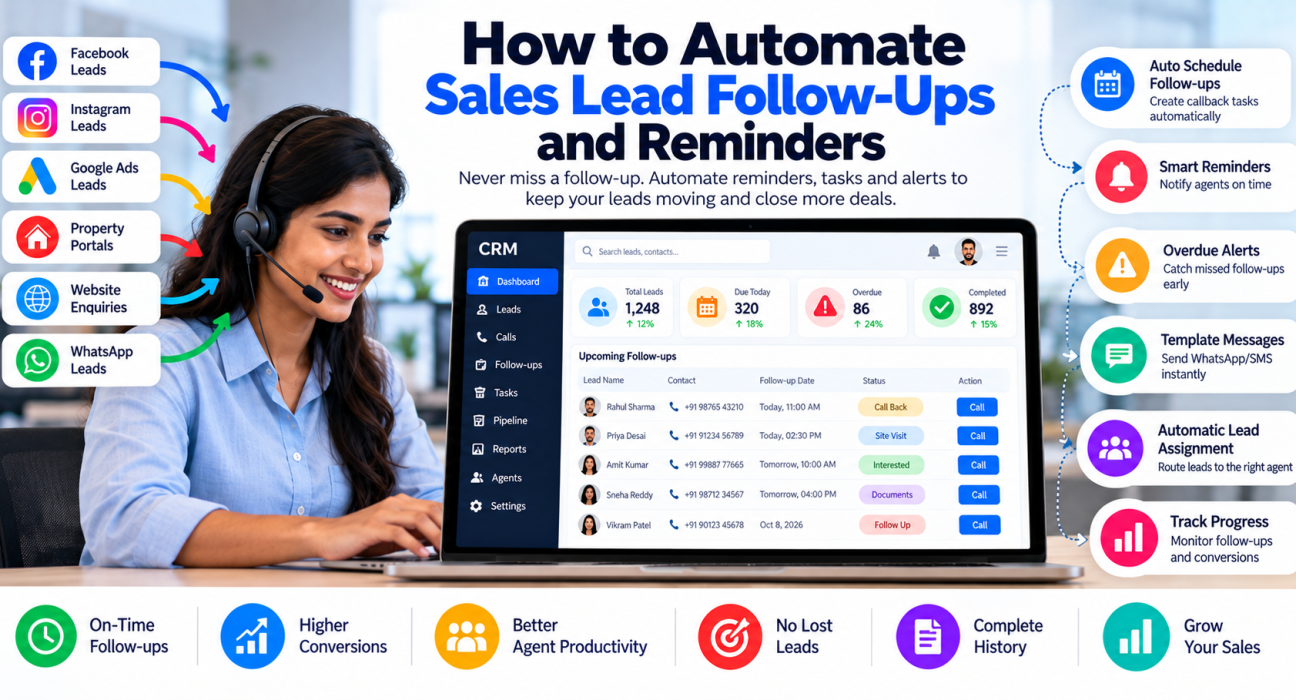
This is the most common way sales teams lose business, and it is exactly what sales follow up automation is meant to prevent. When your CRM schedules callbacks, sends reminders and alerts managers automatically, follow-ups stop depending on memory. A CRM with follow-up reminders and workflow automation can take over much of this routine work so agents spend their time on conversations.
What Is Sales Follow-Up Automation?
Sales follow-up automation is the use of CRM software to schedule, remind and trigger follow-up actions on leads automatically, such as callback reminders, task creation, lead assignment, alerts for overdue leads and message templates. It reduces manual tracking while agents still handle the actual conversations.
Automation does not mean replacing agents with robots. It means the system remembers what needs to happen next, so people do not have to.
Why Manual Follow-Up Fails
Manual follow-up works when volume is low. It breaks down because:
- Memory is unreliable. Agents juggle dozens of leads a day.
- Notes are scattered. Promises live in notebooks, WhatsApp chats or personal phones.
- Managers cannot see gaps. A missed callback is invisible until the lead complains or disappears.
- Priorities are unclear. Agents often call whoever is easiest, not whoever is due.
- Handovers fail. When an agent leaves or goes on leave, their follow-ups disappear.
Automation addresses each of these by turning every promise into a dated task that someone can see.
What Can Be Automated, and What Should Stay Human?
Not every part of follow-up should be automated. Use this as a guide.
| Task | Automate? | Why |
|---|---|---|
| Creating a callback task after a call | Yes | Prevents forgotten promises |
| Reminder to the agent on the due date | Yes | Keeps follow-ups on time |
| Alerts for overdue follow-ups | Yes | Helps managers act early |
| Assigning new leads to agents | Yes | Speeds up the first call |
| Sending a standard WhatsApp or SMS template | Yes, with care | Saves time for routine messages |
| Moving a lead to a new stage after an event | Yes | Keeps the pipeline accurate |
| The sales conversation itself | No | Needs judgement and empathy |
| Negotiation and objection handling | No | Needs a human |
| Deciding which leads deserve extra effort | Partly | Scoring helps, but humans decide |
A good rule: automate reminders, routing and routine messages. Keep conversations, pricing discussions and relationship-building with people.
Types of Follow-Up Automation
1. Callback scheduling
After a call, the agent selects an outcome such as “Call Back” and picks a date and time. The CRM saves it and reminds the agent when it is due.
2. Overdue alerts
If the follow-up is not done on time, the CRM flags it to the agent and, if set up, the manager. This helps catch slipping leads early.
3. Recurring follow-ups
Some leads need regular contact, such as renewals or long decision cycles. Recurring reminders ensure they are not forgotten between campaigns.
4. Event-based workflows
A trigger starts an action. For example: “When a new lead is created from a Facebook form, assign it to the next available agent and schedule a first call within the working day.”
5. Template messages
Agents or the system can send pre-approved WhatsApp, SMS or email templates, such as a brochure, a visit confirmation or a payment reminder. Check consent and messaging rules before using these.
6. Stage-based rules
When a lead moves to a stage such as “Site Visit Scheduled” or “Documents Pending,” the CRM can create the next task automatically.
How to Set Up Sales Follow-Up Automation: Step by Step
1. Map your current follow-up process
Write down what happens after a lead arrives. Who calls first? How soon? What happens if the lead does not answer? How many attempts are made?
2. Define standard call outcomes
Use a short list, for example: Not Answered, Interested, Call Back, Not Interested, Wrong Number, Won. Each outcome should lead to a clear next step.
3. Create follow-up rules
Examples of rules:
- Not Answered: retry the same day, then the next day, up to a set number of attempts.
- Call Back: schedule at the time the lead requested.
- Interested: follow up within a short, defined period.
- Not Interested: close or move to a nurture list.
4. Set response-time targets for new leads
Decide how quickly new leads must be called. Choose a target your team can meet consistently, and measure it.
5. Set up reminders and alerts
Agents should get reminders for due tasks. Managers should see overdue follow-ups by agent.
6. Add routine messages carefully
Create templates for common situations. Keep them short, relevant and clearly from your business. Do not send messages to people who have opted out.
7. Train the team
Agents must understand that every call ends with a next step and a date. If they skip this, automation has nothing to work with.
8. Review weekly and adjust
Look at overdue counts, missed callbacks and conversion by stage. Remove rules that create noise. Add rules where leads are still slipping.
Examples of Follow-Up Automation in Practice
These are hypothetical examples to illustrate how rules can work. They are not customer case studies.
Real estate: After a site visit is scheduled, the CRM creates a reminder to confirm the visit the day before and a follow-up the day after. Leads who miss the visit are flagged for a rescheduling call.
Education: A counsellor marks a parent as “Call Back after 6 PM.” The CRM reminds the counsellor at that time. If the application deadline is near, the manager gets an alert for leads with pending documents.
Insurance: Renewal leads get a recurring reminder before the due date. The agent also sends a standard reminder message through the CRM.
Loan and finance: When a lead moves to “Documents Pending,” the CRM creates a task to follow up in two days and alerts the manager if it is overdue.
Common Mistakes in Follow-Up Automation
- Automating a broken process. If your follow-up steps are unclear, automation only makes confusion faster.
- Too many reminders. Agents start ignoring alerts. Keep rules few and meaningful.
- Over-messaging leads. Repeated automated messages can annoy people and harm your brand.
- Ignoring consent and DNC rules. Follow applicable Indian regulations, including TRAI rules, for calls and messages.
- No manager visibility. Alerts that nobody reviews do not solve the problem.
- Letting agents skip the next step. If agents do not log outcomes, automation cannot work.
- Never reviewing results. Rules need adjusting as your team and leads change.
What to Look For in Follow-Up Automation Software
- Callback scheduling with date and time
- Reminders for agents, and overdue alerts for managers
- Recurring follow-ups
- Rules based on lead creation or stage changes
- Lead assignment rules
- Message templates for WhatsApp, SMS and email
- Call logging so outcomes feed the rules
- Reports on follow-ups done, overdue and missed
- A mobile app for field or remote agents
How TeleCallingCRM Supports Follow-Up Automation
TeleCallingCRM is a telecalling CRM built for Indian outbound sales teams. Based on its website, relevant capabilities include:
- Follow-ups and reminders: Callback scheduling, reminders, overdue alerts and recurring follow-ups.
- Automations and workflows: A no-code workflow builder with event triggers and conditional rules. The site describes auto-assigning leads, scheduling follow-ups, pushing WhatsApp nudges and alerting managers when a lead is created or a stage changes.
- Messaging: WhatsApp templates, SMS (via MSG91 with DLT) and email through your own SMTP.
- Call tracking: Calls are logged with duration, outcome, recording and notes.
- Lead handling: Import, auto-distribution, de-duplication and DNC checks.
- Team visibility: A live view of agent activity and reports.
- Mobile app: For agents working outside the office.
You can read more about how a telecalling setup works for a specific sector, for example on the insurance CRM page or the real estate CRM page. To understand the monitoring side, see this post on live reports and the war room.
TeleCallingCRM suits teams that follow up mainly by phone. If your sales process is largely email sequences with long, marketing-led nurturing, compare it with tools built for that. Whatever you choose, test it with your real follow-up process first.
Quick Checklist
- Does every call end with an outcome and a next step?
- Are outcomes standardised?
- Do agents get reminders on the due date?
- Do managers see overdue follow-ups?
- Do new leads get a response-time target?
- Are message templates short and consent-based?
- Do you review overdue and missed follow-ups weekly?
Frequently Asked Questions
What is sales follow-up automation?
It is the use of CRM software to schedule and trigger follow-up actions automatically, such as callback reminders, overdue alerts, lead assignment and template messages. It helps teams avoid missed follow-ups while agents focus on actual conversations.
How do I automate follow-ups in a CRM?
Standardise your call outcomes, then create rules for each. For example, schedule a callback for “Call Back,” retry “Not Answered” leads after a set period and alert managers when follow-ups become overdue. Train agents to log every outcome.
Can automation replace telecallers or sales agents?
No. Automation handles reminders, routing and routine messages. Agents still hold the conversations, handle objections and build trust. Automation simply makes sure agents know whom to call, and when.
How many times should I follow up with a lead?
There is no universal number. It depends on your product, sales cycle and lead quality. Set a clear number of attempts and gaps between them, review results and adjust. Stop contacting people who ask you to.
What is the best way to remind agents about follow-ups?
Use in-app or mobile notifications tied to the lead record, with date and time. Combine this with a daily list of due follow-ups and manager alerts for overdue ones, so reminders are visible and reviewed.
Is it okay to send automated WhatsApp or SMS messages to leads?
Yes, if you follow consent and messaging rules and keep messages relevant. Use approved templates, avoid over-messaging and respect opt-outs and DNC preferences. Check current TRAI and platform guidelines for your use case.
What is the difference between a reminder and a workflow?
A reminder tells an agent that a task is due. A workflow is a rule that triggers actions automatically, such as assigning a lead, creating a task and notifying a manager when a new lead is created or a stage changes.
Do small teams need follow-up automation?
Even small teams benefit once leads come from multiple sources or more than a few people follow up. If you regularly miss callbacks or cannot see overdue leads, automation will likely help.
Conclusion
Sales follow up automation works best when the process is simple: every call has an outcome, every outcome has a next step and every next step has a date. The CRM then reminds the right person at the right time, and managers can see what is slipping.
If your team follows up by phone, lead follow-up software that combines calling, reminders and workflows can reduce the manual tracking. Start with a few clear rules, review them weekly and let your agents focus on the conversations that win business.