A student enquiry can come from a website form, Google or Meta ad, education portal, phone call, referral or walk-in. The challenge begins after the enquiry arrives. If it is not assigned quickly, called on time and followed up consistently, the student may move to another institution.
An Education CRM gives admission and counselling teams one place to capture, organize and follow up with these enquiries. For teams that depend heavily on phone calls, a telecalling-focused CRM can bring lead management, calling, follow-ups, pipeline tracking and team reporting into the same workflow.
For education businesses looking for a more structured lead management software approach, the right CRM should fit the actual admission journey rather than simply store student contact details.
What Is an Education CRM?
An Education CRM is software used by educational organizations to manage prospective students from their first enquiry through counselling, application and enrolment.
Instead of maintaining student enquiries across spreadsheets, phone logs, WhatsApp conversations and separate lead sources, an Education CRM centralizes the information and gives counsellors a structured process for handling each enquiry.
A typical education lead journey may look like:
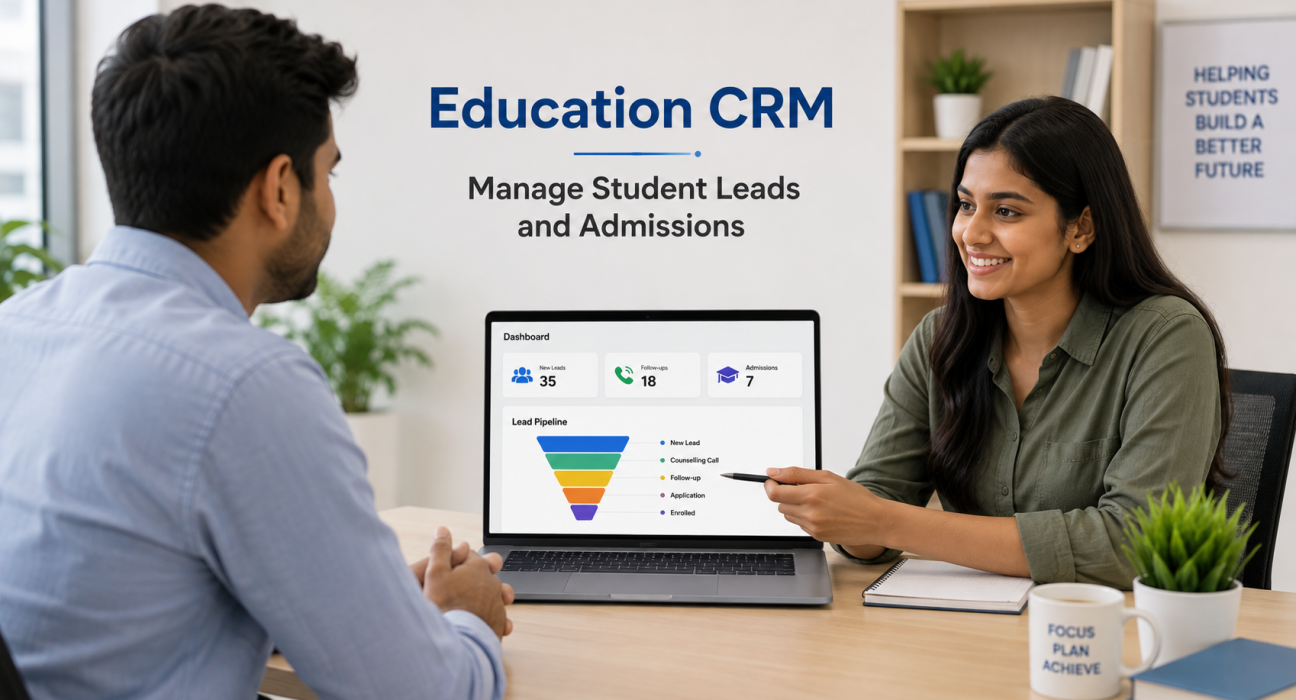
New Enquiry → Counselling Call → Counselling Completed → Follow-Up → Application → Enrolled
The exact stages can vary by institution. A coaching institute may track demo-class enquiries, while a college may need stages for application and admission.
A CRM therefore helps answer practical questions such as:
- Which students need a call today?
- Who is responsible for each enquiry?
- What course or programme is the student interested in?
- When was the last conversation?
- What should the counsellor do next?
- How many enquiries have reached the application stage?
- Which counsellors are handling the most leads?
Why Education Teams Need a CRM for Lead Management
Education businesses often generate enquiries in large volumes, particularly during admission seasons and marketing campaigns. Managing these leads manually can become difficult when multiple counsellors are involved.
Three problems are particularly common.
1. Leads get scattered
Enquiries may arrive through different sources such as websites, social media advertisements, education portals and offline campaigns. Without a central system, counsellors may work from different spreadsheets or lists.
An Education CRM can bring these enquiries into a common workspace. TeleCalling CRM’s education workflow, for example, supports lead sources including Facebook and Instagram Ads, Google Ads, website forms, JustDial and Sulekha.
2. Follow-ups are missed
A student may not enroll after the first conversation. They may need more information about fees, course structure, batches, scholarships or career opportunities.
This makes follow-up management an important part of the admission process. A lead follow-up software system can help counsellors schedule callbacks and maintain the history of previous interactions.
3. Managers lack visibility
When information is maintained manually, managers may find it difficult to understand how many leads are active, how many are being followed up and where prospects are dropping out.
A CRM creates a common view of the pipeline, making it easier to review lead stages, counsellor activity and conversion progress.
How Does an Education CRM Work?
An Education CRM generally connects lead capture, assignment, calling, follow-up and reporting into a single process.
Step 1: Capture student enquiries
The first requirement is to bring enquiries into the CRM.
Depending on the organization, leads may come from:
- Google Ads
- Facebook and Instagram Ads
- Website forms
- Education portals
- Phone enquiries
- Walk-ins
- Referrals
- CSV imports
The objective is simple: every enquiry should have a clear record instead of becoming an isolated phone number or spreadsheet entry.
Step 2: Assign leads to counsellors
Once a lead enters the system, it can be assigned to the appropriate counsellor.
Assignment can be based on factors such as:
- Course interest
- Location
- Campaign
- Branch
- Counsellor availability
- Lead ownership
TeleCalling CRM’s education page states that education leads can be auto-assigned or manually assigned to counsellors.
Step 3: Call and record the outcome
The next step is contacting the student or parent.
A telecaller CRM can make this process more organized by giving counsellors a queue of leads to contact. TeleCalling CRM describes a sequential auto-dialing workflow with one-tap call outcomes and automatic call-duration capture.
After a call, the counsellor can record an outcome such as:
- Interested
- Call back later
- Counselling required
- Application pending
- Not interested
- Enrolled
- Lost
The exact outcomes should be customized around the institution’s admission process.
Step 4: Schedule the next follow-up
Not every student is ready to make an immediate decision.
A proper CRM for telecallers should therefore make it easy to schedule the next action. Instead of relying on memory, counsellors can work from a list of scheduled callbacks and pending follow-ups.
This is especially useful during admission campaigns when one counsellor may handle hundreds of enquiries.
Step 5: Track the admission pipeline
The CRM should show where each enquiry currently stands.
For example:
| Stage | What it means |
|---|---|
| New Lead | Fresh student enquiry |
| Counselling Call | Counsellor has contacted the prospect |
| Counselling Done | Course or programme discussion completed |
| Follow-Up | Student needs additional communication |
| Application | Student has started the admission process |
| Enrolled | Admission completed |
| Lost | Opportunity is no longer active |
TeleCalling CRM’s education workflow includes stages such as New Lead, Counselling Call, Counselling Done, Follow-Up, Application, Enrolled and Lost.
Important Education CRM Features to Look For
Not every CRM is designed around the same workflow. Education teams should prioritise capabilities that support their actual counselling and admission process.
Lead management
The CRM should make it easy to capture, assign, filter and update student enquiries.
Useful education-specific fields can include:
- Course interested
- Preferred batch or intake
- Qualification
- Fee budget
- Counsellor assigned
- City
- Lead source
These fields help counsellors understand the enquiry before making a call.
Auto dialer and call management
For teams handling a high volume of enquiries, manually selecting numbers can consume considerable working time.
An auto dialer can queue assigned leads so counsellors can move from one call to the next while recording outcomes.
Follow-up reminders
A follow-up system should make pending callbacks visible.
This helps prevent situations where a counsellor remembers an enquiry only after several days or forgets to contact a prospect after promising to call back.
Pipeline tracking
A visual pipeline helps managers understand the movement of enquiries from initial contact to admission.
It also provides a clearer view of where leads are getting delayed.
Counsellor performance reporting
Managers may want to review:
- Number of calls
- Talk time
- Follow-ups
- Conversions
- Enrolments
- Lead ownership
- Pipeline value
TeleCalling CRM states that its education workflow includes a live war room, leaderboard, attendance and utilization tracking for team monitoring.
Mobile access
Counsellors and field teams may not always work from a desktop. Mobile access can help them view assigned leads, make calls, record outcomes and manage follow-ups while working away from the office.
How an Education CRM Can Help Different Education Businesses
The ideal workflow differs depending on the type of organization.
Coaching institutes
A coaching institute may receive enquiries for entrance-exam preparation, foundation courses or demo classes.
The CRM can help counsellors track:
Enquiry → Demo Class → Counselling → Follow-Up → Fee Discussion → Enrolment
Colleges and universities
College admission teams may handle a larger seasonal volume of enquiries.
A structured CRM can help organize:
Enquiry → Course Interest → Counselling → Application → Document Process → Admission
EdTech companies
An EdTech business may generate leads from digital advertising, landing pages and online course campaigns.
The focus may be:
Ad Lead → First Call → Course Discussion → Follow-Up → Trial/Demo → Purchase
Education consultants
Consultants may manage students interested in different universities, courses or destinations.
A CRM can help keep student requirements and previous conversations accessible to the counsellor handling the enquiry.
Education CRM vs. Spreadsheet-Based Lead Management
A spreadsheet can work for a very small team, but problems often appear as the number of leads and counsellors increases.
| Area | Spreadsheet | Education CRM |
|---|---|---|
| Lead assignment | Manual | Structured or automated |
| Call history | Often separate | Centralized |
| Follow-ups | Manual reminders | Scheduled follow-ups |
| Pipeline | Basic | Stage-based |
| Team visibility | Limited | Central dashboard |
| Lead ownership | Can become unclear | Clearly assigned |
| Reporting | Manual | CRM-based reporting |
| Scaling | Becomes difficult | Designed for larger workflows |
The key difference is not simply where the data is stored. It is how the team works with that data every day.
How TeleCalling CRM Fits Education Sales and Counselling Teams
TeleCalling CRM positions its education solution around the enquiry-to-enrolment process. Its education-specific page describes automatic lead capture and assignment, an auto dialer, follow-up reminders, pipeline and revenue tracking, team monitoring and mobile access.
The platform also describes features including AI call analysis, auto dialing, lead distribution, pipeline management, follow-ups, messaging, team monitoring and analytics.
For an education organization, the important question is not whether a CRM has the longest feature list. The better question is whether it supports the team’s actual process from student enquiry to counselling to enrolment.
Best Practices for Using an Education CRM
Buying CRM software alone does not create a better admission process. Teams also need clear operating rules.
Standardize lead stages
Define what each pipeline stage means. This prevents different counsellors from using the same status in different ways.
Set follow-up rules
Decide when counsellors should call again after different outcomes. For example, a student requesting a callback tomorrow should not be treated the same as someone who needs long-term nurturing.
Keep lead data clean
Duplicate leads and incomplete records can make reporting unreliable. Regularly review duplicate, invalid and outdated enquiries.
Record meaningful call outcomes
Avoid generic notes such as “talked” or “call done”. Record the student’s actual requirement and the next action wherever possible.
Review performance regularly
Managers should look beyond the number of calls made. Review lead quality, follow-up completion, counselling progression and enrolments to understand where the process needs improvement.
What Should You Consider Before Choosing an Education CRM?
Before selecting a platform, ask these questions:
- Can it capture leads from the sources we currently use?
- Can leads be assigned to individual counsellors?
- Can counsellors see their pending follow-ups?
- Does it support calling and call tracking?
- Can we customize pipeline stages?
- Can managers monitor counsellor performance?
- Can the team access it on mobile devices?
- Can we export or import lead data?
- Does the CRM fit our team size and budget?
- Can the system be adopted without making the counselling process unnecessarily complicated?
A good CRM should reduce manual coordination rather than add another layer of work.
FAQs About Education CRM
What is an Education CRM?
An Education CRM is a customer relationship management system designed to help education businesses manage student enquiries, counselling interactions, follow-ups and admissions. It centralizes prospective-student information and provides a structured way to move enquiries through the admission pipeline.
Why is CRM important for education?
CRM is important because education teams often handle large numbers of enquiries across different channels. A CRM helps centralise these leads, assign ownership, track calls, schedule follow-ups and monitor progress from enquiry to enrolment.
Can an Education CRM manage telecalling?
Yes. A telecalling-focused Education CRM can combine lead management with calling workflows. Features such as auto dialling, call outcome logging, call history and follow-up scheduling can help counselling teams manage phone-based admissions more systematically.
Is an Education CRM useful for coaching institutes?
Yes. Coaching institutes can use CRM software to manage enquiries for courses, batches and demo classes. It can help counsellors organise leads, schedule callbacks and track prospects through counselling and enrolment.
Can an Education CRM track counsellor performance?
A CRM can provide performance information such as calls, activity, follow-ups, conversions and enrolments, depending on the platform. TeleCalling CRM’s education solution includes team monitoring and a leaderboard for counsellor activity and performance.
What is the difference between a telecaller CRM and a regular CRM?
A telecaller CRM puts calling and follow-up workflows at the Centre of lead management. A general CRM may support calling, but a telecalling-focused platform is designed around activities such as lead queues, calling, outcomes, callbacks and team activity.
Can an Education CRM be used by EdTech companies?
Yes. EdTech businesses can use an Education CRM to manage leads generated through online campaigns, websites and other sources. The workflow can be adapted to course enquiries, counselling, demos, trials and purchases.
Conclusion
An Education CRM is most useful when it connects the complete lead-handling process instead of simply storing student information. For education businesses, that means capturing enquiries, assigning them to counsellors, making timely calls, recording outcomes, managing follow-ups and tracking the journey towards enrolment.
Before choosing an education lead management platform, map your existing admission process and identify where leads are being delayed or lost. Then select a CRM that supports those specific workflows.