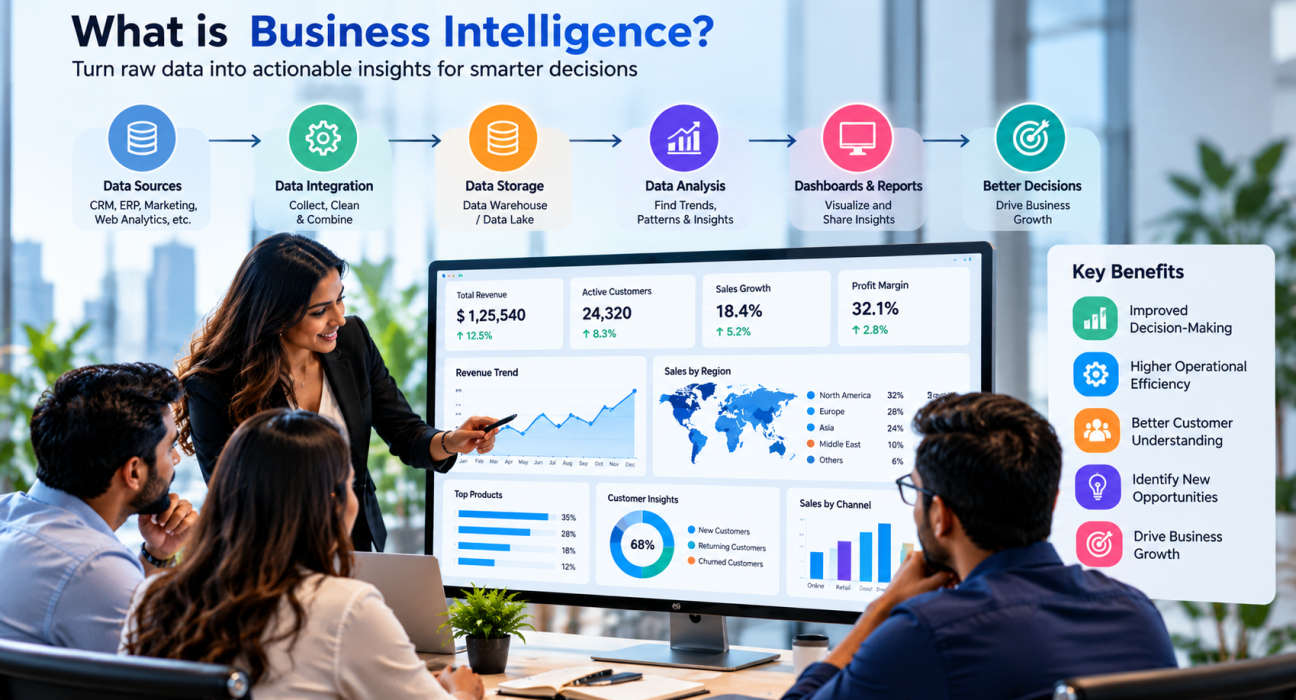
Most businesses today sit on more data than they can use. Sales figures live in one system, customer details in another, and marketing results in a third. When a leader asks a simple question like “Which product is actually making us money?”, the answer can take days to pull together.
That is the problem business intelligence solves. So, what is business intelligence? It is the set of tools, processes, and practices that turn raw business data into clear, usable insights for decision-making. This guide explains how it works, what a BI system includes, where it is used, and how to get started.
What Is Business Intelligence?
Business intelligence (BI) is the process of collecting, organizing, analyzing, and presenting business data so people can make better, faster decisions.
BI typically pulls data from sources such as CRM platforms, accounting software, e-commerce stores, marketing tools, and internal databases. It cleans and combines that data, then shows it in dashboards, reports, and visualizations that non-technical people can read.
BI mostly answers questions about what has happened and what is happening now, such as:
- What were our sales last quarter, and how do they compare with the same quarter last year?
- Which marketing channels bring in the most qualified leads?
- Where are customers dropping off in our checkout process?
- Which regions or products are underperforming?
BI is not about collecting more data. It is about making the data you already have easy to understand and act on.
How Does Business Intelligence Work?
BI follows a fairly consistent flow, whatever tools a company uses. Here is the process in five steps.
1. Data collection
The first step is gathering data from the places it already lives. This can include:
- Customer relationship management (CRM) systems
- Enterprise resource planning (ERP) software
- Website and app analytics
- Spreadsheets and flat files
- Payment, billing, and support platforms
- Third-party or cloud applications
2. Data integration and preparation
Raw data is rarely ready to use. Formats differ, duplicates exist, and fields are missing. This step is often called ETL (extract, transform, load). Data is pulled from its sources, cleaned and standardized, then loaded into a central location.
Good preparation matters more than most people expect. If the data is inconsistent, the dashboards built on top of it will be misleading.
3. Data storage
Prepared data is usually stored in a data warehouse, a central repository designed for reporting and analysis. Some organizations also use data lakes for large volumes of raw or unstructured data, or data marts for specific departments such as finance or sales.
4. Data analysis
Once the data is stored, analysts and BI tools query it to find patterns, trends, and outliers. Common techniques include:
- Querying and reporting, to pull specific figures on demand
- Trend analysis, to see how a metric changes over time
- Drill-down analysis, to move from a high-level number to its underlying detail
- Benchmarking, to compare performance against targets or past periods
5. Data visualization and reporting
Finally, results are shown in dashboards, charts, scorecards, and scheduled reports. A good dashboard lets a sales manager, finance lead, or founder see the numbers that matter at a glance, filter by date or region, and click into details without writing code.
Key Components of a Business Intelligence System
A working BI setup usually combines several parts:
| Component | What it does |
|---|---|
| Data sources | The systems that generate business data (CRM, ERP, web analytics, etc.) |
| ETL / data pipelines | Move and clean data from sources into storage |
| Data warehouse | Stores structured, analysis-ready data in one place |
| BI and analytics tools | Let users query, explore, and visualize data |
| Dashboards and reports | Present insights to decision-makers |
| Data governance | Sets rules for data quality, access, and security |
Not every company needs every layer on day one. A small business might start with a BI tool connected directly to a few data sources, then add a warehouse as data volume and complexity grow.
Business Intelligence vs. Business Analytics vs. Data Science
These terms are often mixed up. They overlap, but they are not the same.
| Business Intelligence | Business Analytics | Data Science | |
|---|---|---|---|
| Main focus | What happened and what is happening | Why it happened and what may happen next | Building models and algorithms from complex data |
| Typical output | Dashboards, reports, KPIs | Forecasts, root-cause analysis | Predictive and machine learning models |
| Typical users | Business teams and managers | Analysts | Data scientists and engineers |
| Technical depth | Lower for end users | Moderate | High |
In practice, these functions often work together. BI gives the everyday visibility, analytics goes deeper into causes and forecasts, and data science handles advanced modeling.
Benefits of Business Intelligence
When BI is set up well, businesses can expect several practical benefits.
- Faster decisions. Teams stop waiting for manual reports and can check current numbers themselves.
- A single view of performance. Data from different departments appears in one place, which reduces conflicting spreadsheets.
- Better visibility into customers. You can see buying patterns, retention, and support trends.
- Early problem detection. Unusual drops or spikes stand out sooner.
- More efficient operations. Leaders can spot bottlenecks, wasted spend, and slow processes.
- Stronger accountability. Shared KPIs make it clear how teams are performing against goals.
The size of these benefits depends on data quality, how well the tools fit the business, and whether people actually use the insights.
Real-World Examples of Business Intelligence
BI is useful in almost every function. A few realistic examples:
- E-commerce: A store owner tracks conversion rates, cart abandonment, and top-selling products, then adjusts pricing and promotions based on what the data shows.
- Marketing: A marketing manager compares lead volume and cost per lead across channels, then shifts budget toward the ones that produce paying customers.
- Finance: A finance team monitors revenue, expenses, and cash flow in one dashboard instead of stitching together monthly spreadsheets.
- Sales: A sales director reviews pipeline stages and win rates by rep or region to see where deals are stalling.
- Operations: An operations manager tracks delivery times, inventory levels, and supplier performance.
- SaaS: A product manager watches feature usage, churn, and onboarding completion to decide what to improve next.
Types of Business Intelligence Tools
BI tools generally fall into a few categories. The right choice depends on your team’s skills, data volume, and budget.
- Dashboard and visualization tools help users build interactive charts and reports. Microsoft Power BI, Tableau, Qlik, and Looker are widely used examples.
- Self-service BI platforms let business users explore data without depending on IT for every request.
- Embedded BI places dashboards inside another application, such as a customer portal or SaaS product.
- Cloud data warehouse platforms store and process large datasets, and BI tools connect to them.
- Custom BI solutions are built by a development team when off-the-shelf tools cannot meet specific requirements or integrations.
Features, pricing, and integrations change often, so verify current details with each vendor before making a decision.
Common Business Intelligence Challenges
BI projects can stall for predictable reasons. Watch for these:
- Poor data quality. Duplicate, outdated, or inconsistent data leads to unreliable reports.
- Data silos. If systems are not connected, you will not get a complete picture.
- Unclear goals. Dashboards built without clear questions in mind tend to go unused.
- Low adoption. If tools are hard to use, people go back to spreadsheets.
- Security and access concerns. Sensitive data needs proper permissions and governance.
- Overbuilding. Teams sometimes buy complex platforms when a simpler setup would do.
How to Get Started With Business Intelligence
You do not need a large program to begin. This practical approach works for most startups, SMBs, and enterprise teams.
- Define the business questions. Start with decisions you need to make, not with tools. For example: “Which channels drive our most profitable customers?”
- Choose a small set of KPIs. Pick metrics tied to real goals, such as revenue growth, customer acquisition cost, retention, or delivery time.
- Audit your data sources. List where the data lives, who owns it, and how reliable it is.
- Fix the basics. Standardize naming, remove duplicates, and decide on a single source of truth for key figures.
- Pick tools that fit your team. Consider ease of use, integrations with your existing systems, security, scalability, and total cost.
- Start with one or two dashboards. Build something useful for one team first, gather feedback, and improve it.
- Train users and set data rules. Adoption and governance decide whether BI lasts.
- Review and expand. Add new data sources and departments once the first use case is working.
When to Bring in a Business Intelligence Partner
Some companies handle BI in-house. Others need outside help, especially for data integration, custom dashboards, warehouse setup, or connecting BI with existing software. A technology partner may be worth considering when:
- Your data is spread across many disconnected systems
- You need custom development or integration work
- Your internal team lacks data engineering or analytics experience
- You are planning a larger data modernization effort
When comparing providers, look at relevant project experience, technical skills, industry knowledge, communication, security practices, and support after launch. Ask for examples similar to your use case, and check client feedback where it is available.
Platforms like GoFirms let businesses research and compare technology and software development companies in one place, which can make shortlisting easier. Always confirm details directly with any company you are considering.
Frequently Asked Questions
What is business intelligence in simple terms?
Business intelligence is the practice of turning company data into clear reports and dashboards that help people make decisions. It gathers information from different systems, organizes it, and presents it in a form that is easy to read, so teams can see what is happening and act on it.
How does business intelligence work?
BI collects data from sources like CRMs and accounting tools, cleans and combines it, stores it in a central location such as a data warehouse, and analyzes it. The results appear in dashboards and reports, where users can filter, explore, and track key performance indicators.
What are the main components of business intelligence?
The main components are data sources, data integration (ETL) processes, a data warehouse or other storage layer, BI and analytics tools, dashboards and reports, and data governance. Together they move data from raw records to insights that decision-makers can use.
What is the difference between business intelligence and business analytics?
Business intelligence mainly describes what has happened and what is happening now, using dashboards and reports. Business analytics goes further, exploring why something happened and what might happen next through techniques like forecasting. In practice, the two are closely connected and often used together.
Is business intelligence only for large companies?
No. Startups and small businesses use BI too, often with lightweight, cloud-based tools connected to sales, marketing, and finance data. Enterprises typically need more advanced setups, but the core idea is the same: use data to make clearer, faster decisions.
What skills or roles are involved in business intelligence?
BI work commonly involves business analysts, data analysts, BI developers, data engineers, and database administrators, along with business stakeholders who define requirements. Smaller teams may combine these roles, and some companies work with external partners for specialized needs.
How do I choose the right BI tool?
Start with your goals, data sources, and team skills. Then compare tools on ease of use, integrations, scalability, security, support, and total cost. Testing a trial or a small pilot with real data is often the best way to confirm a tool fits your needs.
Conclusion
So, what is business intelligence? It is the practice of turning scattered business data into insights people can actually use. It works by collecting data, preparing and storing it, analyzing it, and presenting it in dashboards and reports. Its value depends less on the tool you pick and more on clear goals, reliable data, and steady adoption.
If you are just starting, focus on a few important questions, fix your data basics, and build one useful dashboard before expanding. If you need outside expertise, you can research and compare relevant technology and software development companies on GoFirms to build a shortlist that fits your project.