Best CRM for Education and Admission Counselling Teams
Most institutes do not lose students because their marketing failed. They lose them because an enquiry sat in a spreadsheet for two days, or a counsellor promised a callback on Tuesday and forgot about it by Thursday.
During peak intake, one counsellor may be holding several hundred open enquiries across different courses, batches and fee ranges. At that volume, memory and Excel stop working. This is where an education CRM built for admission counselling teams becomes the difference between a warm enquiry and a lost one.
This guide explains how to evaluate one properly: what to check, what to ignore, and where institutes usually go wrong.
What is an education CRM?
An education CRM is software that captures student enquiries from every source, assigns them to counsellors, manages calling and follow-ups, and tracks each enquiry from first contact through to enrolment. Unlike a generic sales CRM, it is organised around counselling conversations, admission cycles and course-wise pipelines rather than deals and quarters.
Why admission counselling is not ordinary sales
Before comparing products, it helps to be clear about what makes this work different. Four things stand out.
Speed decides more than persuasion. A student who fills an enquiry form has usually filled three. Research published in Harvard Business Review audited 2,241 companies across sectors including education and found that 37% responded to a web enquiry within an hour, 24% took more than a day, and 23% never responded at all. Among companies that did reply, the average first response took 42 hours, and firms responding within an hour were around seven times more likely to have a meaningful qualifying conversation. Admission enquiries behave the same way. wordpressmegabite
Two people make the decision. The student cares about the course, the campus and the peer group. The parent cares about fees, scholarships, safety and placements. Your CRM notes need to hold both conversations.
Volume is seasonal, not steady. Enquiries triple during intake months and fall away after. A system that works comfortably in September must survive May.
The consideration cycle is long and information-heavy. Fee structure, hostel, documents, entrance dates, instalment options. Each of these is a follow-up, and each one needs a record.
Nine things to check before you choose
Use this as a shortlisting filter. If a product fails three or more of these, it will create work rather than remove it.
| What to check | What good looks like |
|---|---|
| Lead capture | Enquiries from Facebook, Instagram, Google Ads, your website and listing portals arrive automatically, deduplicated |
| Counsellor assignment | Round-robin or rule-based, applied within seconds of the lead arriving |
| Dialing | An auto dialer that queues the next number, so counsellors talk instead of typing numbers |
| Follow-up discipline | Scheduled callbacks with reminders and overdue alerts, not a notes field |
| Education-specific fields | Course interested, preferred batch or intake, qualification, fee budget, city, lead source |
| Pipeline stages | Stages that match admissions, not “prospect / negotiation / closed won” |
| Messaging | WhatsApp templates for brochures and fee structures, plus SMS and email |
| Reporting | Counsellor-wise calls, conversions, talk time and lead-source performance |
| Mobile access | Full calling and logging from a phone, for expos and campus events |
Two of these are worth expanding, because they are the ones buyers most often skip in a demo.
Pipeline stages that match admissions
A generic CRM asks you to bend admissions into a sales funnel. An education-focused pipeline reflects what actually happens: new enquiry, counselling call, counselling done, follow-up, application, enrolled or lost. When stages match reality, your conversion reports mean something.
Follow-up handling under load
Ask the vendor a specific question during the demo: “Show me what a counsellor sees at 9 AM when they have 40 overdue callbacks.” The answer tells you more than any feature list.
Compliance checks most buyers forget
This is where education differs sharply from most industries, and it rarely appears in vendor comparisons.
Telecom rules. TRAI issued the Telecom Commercial Communications Customer Preference Regulations, 2018 to control unsolicited commercial communication, requiring commercial promoters and telemarketers to register on a Distributed Ledger Technology platform and obtain customer consent for promotional messages. The regulator also maintains the National Customer Preference Register, commonly called the DND registry, and lists intended for promotional calling are expected to be screened against it. Your CRM should skip DND-registered numbers automatically rather than leaving it to the counsellor. pibtalk-q
Student data, especially minors. School and junior-college admissions involve children. Section 9 of India’s Digital Personal Data Protection Act, 2023 requires a data fiduciary to obtain verifiable consent from a parent or lawful guardian before processing any personal data of a child, with a child defined as anyone under 18 years of age. Practically, this means you need role-based access, a record of how consent was captured, and a way to delete data on request. dpdpa
Ask any vendor how their system supports this. A vague answer is itself an answer.
Flat pricing versus per-user pricing
Admission teams expand for the season. If you hire six temporary counsellors for the intake window, per-user pricing charges you for every one of them, and you often end up sharing logins to save cost, which destroys your counsellor-wise reporting.
Flat plans priced by team size are usually a better fit for institutes with seasonal staffing. Also check whether features are locked behind higher tiers. Paying extra for call recording or analytics after signing is a common and avoidable annoyance.
An example of how one enquiry should move
The following is a hypothetical example of a coaching institute running Instagram ads for a NEET batch. It illustrates the workflow, not a customer result.
- A parent fills the lead form at 8:40 PM. The enquiry lands in the CRM immediately and is auto-assigned to the counsellor on duty.
- The counsellor calls at 9:05 AM the next morning from the dialer queue. Outcome is logged in one tap: interested, fee budget noted, wants scholarship details.
- A WhatsApp template with the fee structure and batch timings goes out during the call.
- A callback is scheduled for Thursday. On Thursday morning it appears in the counsellor’s pending list with the full previous conversation attached.
- The lead moves to “Application” after the form is submitted, and the admission manager sees stage-wise numbers on the dashboard without asking anyone for a report.
Nothing here is complicated. It simply requires that the process is held by the system instead of by individuals.
Common mistakes institutes make
- Buying on feature count. Counsellors use six or seven screens. The rest is noise.
- Skipping the counsellor trial. Test with the two people who will actually make 80 calls a day, not with the management team.
- Implementing during admission season. Set up before the rush, not during it.
- Ignoring data migration. Ask how existing enquiry sheets will be imported and deduplicated before you commit.
- Not defining stages first. Agree internally on what “counselling done” means. Otherwise your reports will be inconsistent from month one.
Where TeleCallingCRM fits
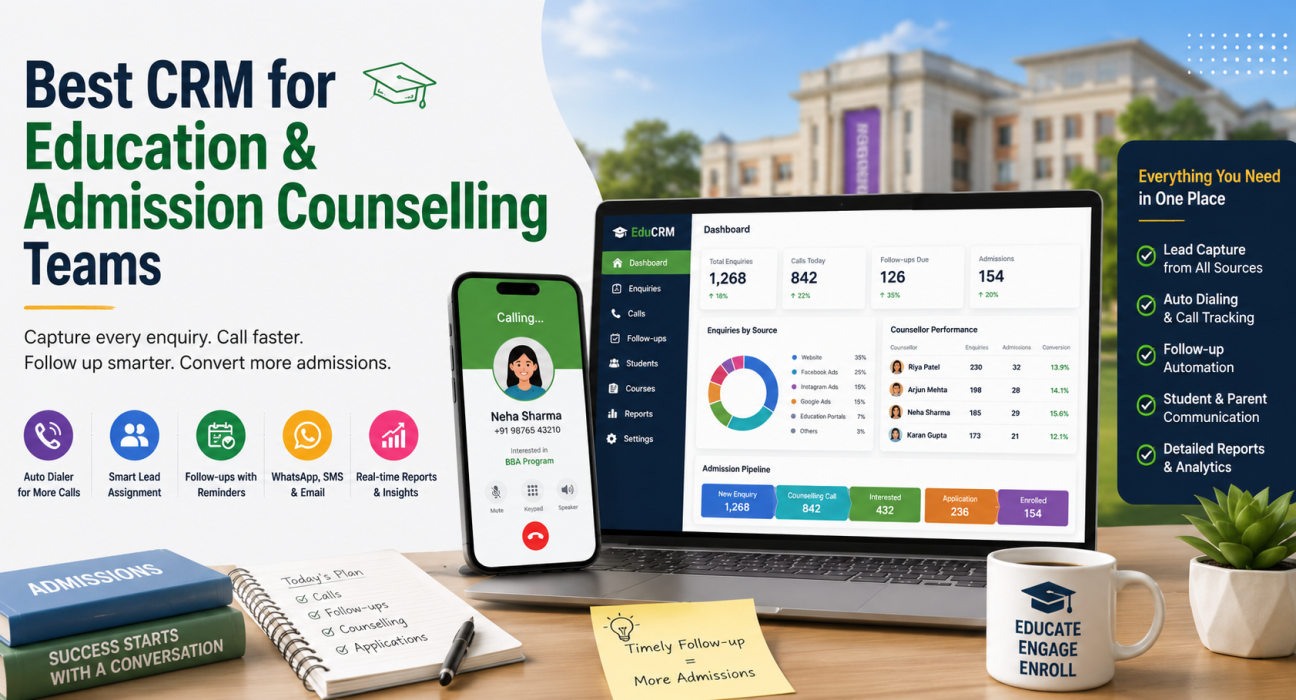
TeleCallingCRM is a telecalling-first CRM, and its education setup ships with an admission pipeline already built: New Lead, Counselling Call, Counselling Done, Follow-up, Application, Enrolled and Lost. Lead fields include course interested, preferred batch or intake, qualification, fee budget, counsellor assigned, city and lead source.
Enquiries connect from Facebook and Instagram Ads, Google Ads, website forms, JustDial and Sulekha, and are deduplicated and assigned automatically. The auto dialer and follow-up features queue calls sequentially, skip DNC numbers, capture call duration, and support one-tap outcome logging. AI call analysis transcribes each call and produces a summary, sentiment reading, quality score and coaching notes, which is useful for training new counsellors during intake.
Managers get a live war room with agent status, talk time and utilisation, plus a leaderboard and attendance tracking. Counsellors can work from Android and iOS apps at expos and school visits, and send WhatsApp templates for brochures and fee details.
Plans are flat monthly rather than per user, starting at ₹999 per month for up to 5 users, with every feature included on every plan and a 3-day free trial without a card. For a broader view of the category, our guide on why educational institutions need a tele calling CRM covers the underlying case in more detail.
A short evaluation process
- Write down your five non-negotiables before you see any demo.
- Shortlist two or three products that meet all five.
- Run a trial with two real counsellors and 100 real enquiries.
- Check three things after a week: were callbacks made on time, is the data complete, do the reports match reality.
- Confirm migration, support response times and compliance handling in writing before you buy.
Frequently asked questions
What is the best CRM for education and admission counselling teams?
There is no single best product for every institute. The right choice depends on your enquiry volume, team size and whether counsellors work from desks or the field. Shortlist tools that capture leads automatically, enforce follow-ups, and report counsellor-wise conversions, then trial two with real enquiries.
Is a general-purpose CRM enough for admissions?
It can work for very small teams, but generic CRMs are built around deals rather than counselling conversations. You usually end up creating custom fields for course and intake, and there is no dialer, so counsellors spend more time on data entry than on calls.
How much does an education CRM cost in India?
Pricing varies widely. Many CRMs charge per user per month, which becomes expensive during admission season. Flat monthly plans are also available; TeleCallingCRM, for example, starts at ₹999 per month for up to 5 users with all features included on every plan.
Can an education CRM handle admission season spikes?
A well-chosen one can. The features that matter under load are automatic lead assignment, a dialer that keeps a queue moving, overdue follow-up alerts, and a real-time dashboard so managers can rebalance work between counsellors during the day.
Does an education CRM help with DND and TRAI compliance?
It helps, but it does not replace your own obligations. Automatic DNC screening prevents calls to registered numbers, and call records support audits. Registration requirements under the TRAI regulations still rest with your institution.
Can counsellors use it during education expos and school visits?
Yes, if the product has a proper mobile app. Counsellors should be able to call, log outcomes, update lead status and schedule follow-ups from a phone, so enquiries collected at an expo enter the system the same day rather than a week later.
How long does implementation usually take?
Simple telecalling-first systems can be running within a day, mainly because setup is limited to importing leads, adding counsellors and confirming stages. Plan for a week of parallel running before the intake period so counsellors are comfortable before volume rises.
Final thoughts
The best CRM for an admission counselling team is rarely the one with the longest feature list. It is the one your counsellors actually update after every call, because that is the only way your follow-up data stays reliable.
Start with your own process, define your stages, then find software that fits. If flat, predictable pricing matters for a seasonal team, it is worth comparing telecalling CRM plans alongside per-user products before you decide, and running a short trial with real enquiries either way.