How to Automate Customer Feedback After Every Field Visit
Most field teams only hear from customers when something goes wrong. A technician finishes a job, a sales rep closes a visit, and the next time you hear about it is a complaint or a lost account. Customer feedback software for field service fixes this by asking for feedback automatically after every visit, so you see the full picture and not just the loud exceptions.
This guide explains why manual feedback collection fails, how to automate it step by step, which metrics to track, and what to look for in software.
Why Manual Feedback Collection Fails Field Teams
Manual feedback collection fails because it depends on people remembering to do it. Field staff are busy and travelling between stops, and managers can’t be at every visit. Common failure points:
- Inconsistent asking. Some reps request feedback and others skip it, so your data reflects who remembered, not how the team performed.
- Delayed follow-up. A call or survey days later gets lower recall and fewer responses.
- Biased results. If the rep who did the job is also the one collecting the rating, customers may hold back honest answers.
- Scattered data. Feedback ends up in WhatsApp chats, notebooks and spreadsheets, so no one can spot patterns by rep, route, service type or region.
- No link to the visit. A comment like “service was late” is hard to act on if it isn’t tied to the specific job, rep and SLA.
What Does It Mean to Automate Customer Feedback After a Field Visit?
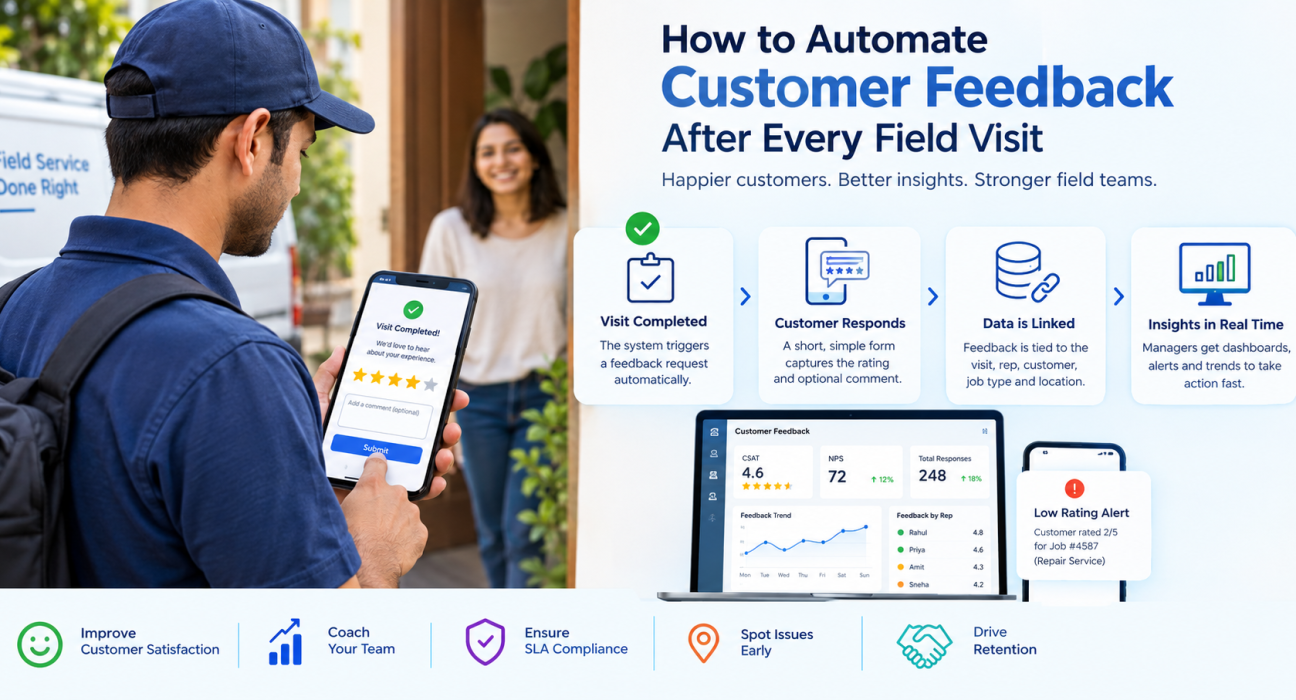
Automating customer feedback means the system requests, captures and reports customer ratings the moment a visit is completed, without a manager or rep triggering it manually.
In practice, closing a visit sets off a short feedback request. The response is stored against that visit record, and the results appear in dashboards your managers already use. Nobody has to remember anything.
How to Automate Customer Feedback After Every Field Visit: Step by Step
- Define what you want to learn. Decide whether you’re measuring satisfaction with the service, the rep’s professionalism, punctuality, or likelihood to recommend. Pick two or three goals, not ten.
- Choose your metrics. Use a standard like NPS or CSAT so results are comparable over time (see the metrics section below).
- Keep the form short. Aim for one rating question and one optional comment. Short forms get more responses.
- Trigger it from visit completion. The request should fire when the job or visit is marked complete, while the experience is fresh.
- Tie the response to the visit record. Every rating should be linked to the rep, customer, job type, location and timestamp.
- Set alert rules for low scores. Route poor ratings to a manager quickly so the issue can be handled while it is still fixable.
- Review trends weekly. Look at scores by rep, territory, service type and time period, and use them for coaching.
- Close the loop. Tell customers what you did about their feedback. This builds trust and encourages future responses.
The Core Metrics: NPS, CSAT and CES
You don’t need every metric. Most field teams do well with one or two.
| Metric | What it measures | Best used for |
|---|---|---|
| CSAT (Customer Satisfaction) | How satisfied the customer was with a specific visit | Per-visit quality tracking |
| NPS (Net Promoter Score) | How likely the customer is to recommend you; calculated as the percentage of promoters minus the percentage of detractors | Relationship health over time |
| CES (Customer Effort Score) | How easy the customer found the experience | Scheduling, rescheduling and service processes |
For post-visit feedback, a simple CSAT-style rating works well because it relates to one specific interaction. NPS is better as a periodic or relationship-level measure, though many teams use it per visit too. Choose one and stay consistent so trends mean something.
What to Look for in Customer Feedback Software for Field Service
Good customer feedback software for field service connects feedback to the visit record, triggers automatically, and shows results by team, rep and job type. When you evaluate options, check for the following.
Automatic triggers tied to visit completion
The feedback request should follow the job status, not a manual action. If a rep has to press “send survey,” you are back to inconsistent collection.
Link to visit data and proof
A rating means more when you can see the visit it belongs to: who went, when, how long, and whether the job was closed with proof such as photos or signatures. This turns a vague complaint into something you can investigate.
Customizable forms
Different services need different questions. A repair call, a sales visit and a collection visit should not use the same form. Look for a no-code form builder so you can adjust questions without developer help.
SLA awareness
Feedback becomes far more useful when you can compare it against whether the SLA was met. If low ratings cluster around late arrivals, you know where to fix the process.
Real-time dashboards and alerts
You should see scores by rep, region and service type, and get notified when a rating falls below your threshold.
Works in real field conditions
Field teams often work in areas with patchy connectivity. Check that visit data and records sync reliably when the network is weak.
Integration with your existing tools
Feedback should flow into the systems you already use, such as CRM or reporting tools, so insights don’t sit in isolation.
How Feedback Automation Improves Field Operations
Once feedback is automatic and linked to visit records, it starts to support decisions across the business:
- Rep coaching. Compare individual scores against team averages and use specific comments in one-to-one reviews.
- Quality assurance. Spot repeat issues, such as a certain service type or area getting consistently lower ratings.
- SLA improvement. Check whether missed or late visits correlate with poor ratings.
- Verification. Customer responses add an independent signal that a visit actually took place, alongside GPS and proof capture.
- Retention. Early warning on unhappy customers gives you a chance to recover the relationship before they leave.
Common Mistakes to Avoid
- Asking too many questions. Long surveys reduce completion rates.
- Letting reps control the process. Automatic triggers keep collection consistent and unbiased.
- Collecting feedback and never reviewing it. Data without a weekly review habit changes nothing.
- Ignoring negative responses. Low scores are the most useful ones. Follow up quickly.
- Using the same form for every job type. Tailor questions to the service.
How FieldExecutives Can Help
Businesses looking to simplify these processes can use field force management software such as FieldExecutives, which brings visit execution and customer feedback into one workflow.
Based on the FieldExecutives website, relevant capabilities include:
- Customer feedback and NPS as part of the platform, so ratings sit alongside operational data.
- Proof of visit through photo, signature and OTP capture, which has to be completed before a job can close.
- SLA monitoring, so you can compare customer ratings against timelines.
- Custom forms and workflows you can build without code, which lets you shape feedback questions per job type.
- Offline-first mobile app, so visits can be completed and synced even with weak connectivity.
- Real-time KPIs and reporting for managers.
Because feedback is connected to visit records, you can see which rep, route and job type a rating relates to, then act on it. For the exact feedback channels and configuration options available for your use case, confirm the details with the FieldExecutives team during a demo.
Conclusion
Manual feedback collection leaves you with patchy data and late warnings. Automating it means every completed visit generates a customer response linked to the rep, job and SLA, and managers get the insight they need to coach teams and fix problems early. The practical takeaway: keep forms short, trigger them on visit completion, review results weekly, and follow up on low scores fast.