Best CRM for Outbound Sales Teams in India
If your sales team spends more time dialing numbers, updating spreadsheets and chasing follow-ups than actually talking to customers, the problem usually isn’t the team. It’s the tool they’re using to manage outbound calling.
Most generic CRMs handle inbound deals and email-heavy sales cycles well. They don’t handle a team that makes 100+ outbound calls a day, needs instant lead assignment, and lives or dies by follow-up discipline. That’s where a dedicated outbound sales CRM changes how a telecalling team actually works.
This guide explains what an outbound sales CRM is, the features that matter most for Indian sales teams, and how to evaluate one before you commit.
What Is an Outbound Sales CRM?
An outbound sales CRM manages teams that call leads proactively, instead of waiting for inbound enquiries. It centres the entire workflow around dialing, lead assignment, call logging and follow-up tracking, rather than treating calling as a secondary feature bolted onto a generic sales pipeline.
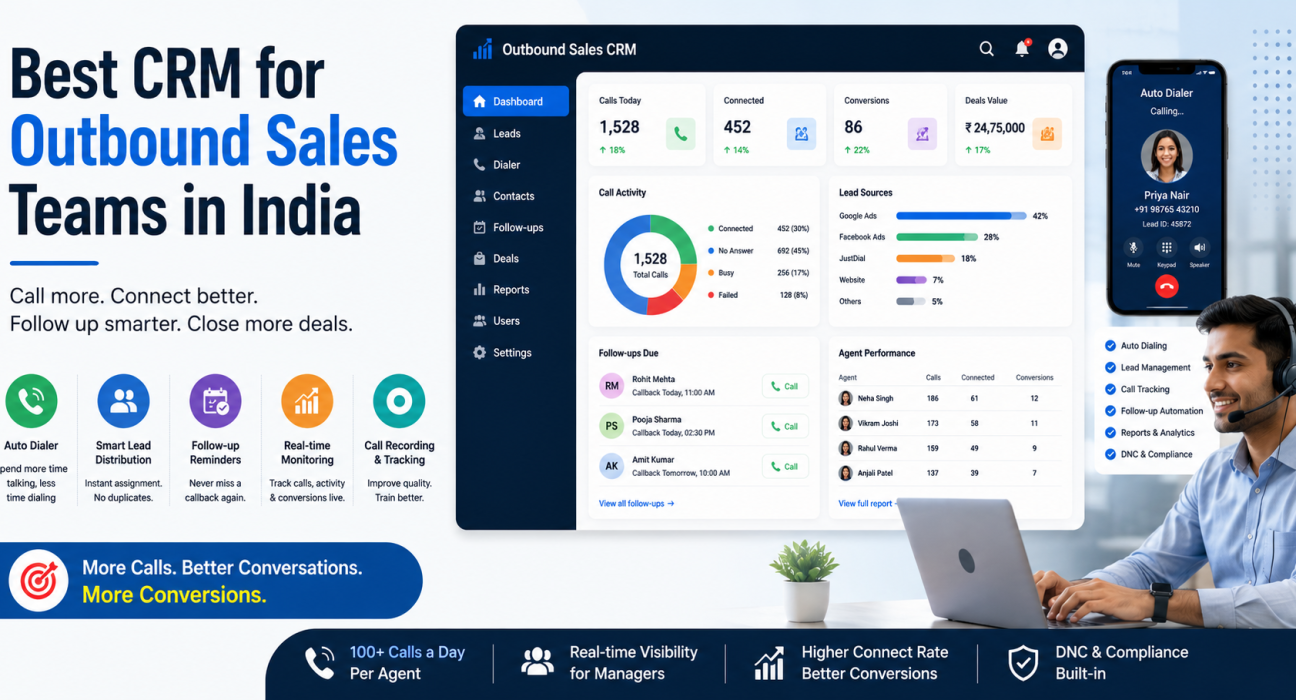
Unlike a standard CRM, an outbound sales CRM typically includes an auto dialer, call recording, real-time agent monitoring and automated follow-up reminders as core, not optional, capabilities.
Why Generic CRMs Struggle With Outbound Calling
Many businesses start with a general-purpose CRM because it’s familiar or cheap. The cracks usually show up once the calling volume increases.
Common gaps include:
- No dialer built in. Agents dial manually from a phone or a separate app, then switch back to log the call — wasting minutes on every single lead.
- Weak lead distribution. Leads sit unassigned, or duplicate across agents, especially when they arrive from multiple sources like Facebook Ads, Google Ads or property portals.
- Follow-ups fall through the cracks. Without automated reminders, agents often forget a promising lead that asked for a callback “next week.”
- No visibility into the floor. Managers can’t tell who’s actually calling, who’s idle, or which agent needs coaching — until the monthly numbers are already down.
- Compliance is an afterthought. Nobody enforces Do Not Call (DNC) list checks or calling-hour restrictions automatically, which creates regulatory risk.
None of these are minor inconveniences. For an outbound-heavy business, they directly affect how many leads get worked and how many of them convert.
Must-Have Features in a CRM for Outbound Sales Teams
Before comparing specific products, it helps to know what “good” looks like. Here’s what a serious outbound sales CRM — sometimes called telecalling software, a telecaller CRM, or sales calling software — should offer.
| Feature | Why It Matters |
|---|---|
| Auto dialer | Removes manual dialing so agents spend time talking, not clicking |
| Lead management & auto-distribution | Assigns every lead instantly and stops duplicates |
| Follow-up reminders | Prevents warm leads from going cold due to missed callbacks |
| Call tracking & recording | Gives managers a record for quality checks, training and disputes |
| Sales pipeline & deal tracking | Shows which leads are close to conversion and what they’re worth |
| Real-time team monitoring | Lets managers see agent activity — calls made, idle time, conversions — as it happens |
| Reporting & analytics | Answers questions like connection rate, answer rate and source performance |
| WhatsApp / SMS / Email support | Lets agents follow up on the channel the customer actually responds to |
| Mobile app | Supports field agents and remote telecalling teams |
| DNC & compliance controls | Keeps calling within legal hours and off restricted numbers |
Which Features to Prioritise First
Not every business needs every feature on day one. A CRM missing more than two or three items from this list will eventually become a bottleneck as the team grows, so weigh the auto dialer, lead distribution and follow-up automation most heavily during evaluation — the rest can wait.
How an Outbound Sales CRM Improves Daily Operations
Consider a hypothetical example: a 12-agent loan DSA (direct selling agent) team receiving leads from Google Ads, JustDial and a partner website.
Without a proper system, a manager typically exports leads to Excel, assigns them manually over WhatsApp, and relies on agents to remember which leads need a callback. Reporting happens once a week, usually after someone manually compiles numbers from multiple sources.
With an outbound sales CRM, leads for the same team would typically land in one place automatically, and a rule (say, round-robin or agent availability) would assign each one before an auto dialer calls it while skipping DNC numbers. Agents schedule follow-ups with one tap instead of a sticky note, and the manager checks connection rates and pipeline value on a live dashboard instead of waiting for a weekly report.
This isn’t about working harder — it’s about removing the manual steps that eat into actual calling time.
Outbound Sales CRM vs Generic CRM
| Aspect | Outbound Sales CRM | Generic CRM |
|---|---|---|
| Dialer | Built in, often one-tap | Usually absent or a paid add-on |
| Lead assignment | Rule-based and automatic | Often manual |
| Call-first workflow | Yes — calling is the core action | No — built around deals/emails |
| Follow-up automation | Native reminders and alerts | Basic tasks, often manual |
| Real-time agent monitoring | Common (a live “war room” view) | Rare |
| Best suited for | Telesales, telecalling, BPOs, field sales | Account-based B2B, long sales cycles |
If your team’s primary activity is picking up the phone and calling leads all day, an outbound-first CRM will almost always outperform a generic one — not because the generic CRM is bad, but because nobody designed it for this workflow.
How to Choose the Right Outbound Sales CRM
Use this checklist while evaluating options, whether it’s telecalling software, telecaller CRM, or lead follow-up software:
- Does it include an auto dialer, or will your team still dial manually?
- How does lead assignment work — does it run automatically, by rule, and without duplicates?
- Does it automate follow-ups with reminders, or does someone have to track them separately?
- Can managers see live activity — who’s calling, who’s idle, what’s in the pipeline?
- Does it support your lead sources — Facebook/Instagram Ads, Google Ads, property portals, website forms, spreadsheets?
Questions to Ask Before You Sign Up
- Does it handle DNC and calling-hours compliance itself, or does your team have to manage that manually?
- Is there a mobile app for agents who call from the field or remotely?
- What’s the actual monthly cost for your team size — per-user pricing can get expensive as you scale?
Go through this list with any vendor’s sales team before signing up. A quick 3-day or 7-day trial is usually enough to tell whether the workflow genuinely fits your team.
Common Mistakes Businesses Make When Choosing a CRM
- Choosing on price alone, then discovering the auto dialer or reporting is a paid add-on.
- Ignoring the mobile experience, which matters a lot for field sales and remote telecalling teams.
- Skipping the trial period and assuming the demo reflects daily reality.
- Underestimating lead volume growth, then hitting per-user pricing walls within a few months.
- Not checking DNC/compliance features, which can create regulatory exposure for outbound calling businesses in India.
Most of these mistakes come from evaluating a CRM as a checklist of features rather than testing the actual daily workflow with real leads.
How TeleCallingCRM Supports Outbound Sales Teams
TeleCallingCRM targets outbound telecalling teams in India specifically. It includes a smart auto dialer, automatic lead assignment, follow-up reminders, call recording, a live team monitoring view, and reporting on metrics like connection and answer rate — all as part of the core product rather than paid add-ons.
It also connects with common Indian lead sources such as Facebook and Instagram Lead Ads, Google Ads, 99acres, Housing.com, MagicBricks, JustDial and Google Sheets, so leads from multiple channels land in one pipeline instead of scattered inboxes.
For teams evaluating options across different industries, including real estate, education, insurance and financial services, it’s worth comparing actual plans and included features on the pricing page rather than relying on a sales call alone.
This article aims to help you evaluate any outbound sales CRM, not just this one — the checklist above applies regardless of which product you choose.
Frequently Asked Questions
What is the difference between a CRM and an outbound sales CRM?
A regular CRM manages customer records and deals generally. An outbound sales CRM centres specifically around calling — with a dialer, automatic lead assignment, and follow-up reminders as core features, not extras.
Is telecalling software the same as an outbound sales CRM?
Largely, yes. “Telecalling software,” “telecaller CRM” and “outbound sales CRM” are commonly used interchangeably to describe tools built for teams that make proactive outbound calls to leads.
Do small businesses need an outbound sales CRM, or is a spreadsheet enough?
Spreadsheets work for very small teams making a handful of calls a day. Once a team crosses a few agents or a few hundred leads a month, manual tracking usually starts causing missed follow-ups and lost leads.
What features should I prioritise first in an outbound sales CRM?
Start with an auto dialer, automatic lead assignment, and follow-up reminders — these three affect daily calling volume and follow-up discipline the most. Reporting and integrations matter, but usually become priorities as the team scales.
Is DNC (Do Not Call) compliance important for outbound sales CRMs in India?
Yes. Calling numbers on the DNC registry or outside permitted calling hours can create regulatory risk. A CRM that enforces DNC checks and calling-hour windows automatically reduces this risk significantly.
Can an outbound sales CRM work for a remote or field sales team?
Yes, provided it has a proper mobile app. Agents working outside an office — such as field sales reps or work-from-home telecallers — need to be able to call, log outcomes and manage follow-ups from their phone.
How much does an outbound sales CRM typically cost in India?
Pricing varies by vendor and team size. Some charge per user per month, which can get expensive for larger teams, while others offer flat monthly plans covering a set number of users. It’s worth comparing the total monthly cost for your actual team size, not just the starting price.
Conclusion
Choosing the right CRM for an outbound sales team isn’t about picking the product with the longest feature list. It’s about finding one that removes the manual work — dialing, assigning leads, chasing follow-ups — so your agents can spend more of the day actually talking to prospects.
Use the checklist in this guide to evaluate any option on your shortlist. If you want to see how a purpose-built outbound sales CRM handles this in practice, you can review the available plans and pricing for a team your size.