Best CRM for Managing Inbound Sales Calls: What to Look For
Every inbound call comes from someone who already wants something from you. They saw your ad, your JustDial listing or your website, and they picked up the phone. If that call is answered late, noted on a scrap of paper or never followed up, the lead often goes to a competitor.
This is why sales teams look for an inbound call CRM that records who called, assigns the enquiry to the right person and reminds the team to follow up. This guide explains which features matter, how to set the process up, and where TeleCallingCRM fits and where it may not.
What Is the Best CRM for Inbound Sales Calls?
The best CRM for inbound sales calls shows the caller’s history when they ring, assigns each lead to a clear owner, logs every call automatically and schedules follow-ups. For most small and mid-sized Indian teams, a simple CRM that the whole team actually uses works better than a heavy enterprise suite.
What is an inbound call CRM?
An inbound call CRM is software that captures and organises customers who call your business. It stores caller details, call history, notes and outcomes in one place. It assigns each enquiry to an owner and tracks it until the deal is won or lost.
Why Inbound Calls Get Lost
Most inbound call problems are process problems, not people problems. Common causes include:
- Calls land on personal phones, so there is no shared record.
- The same customer calls twice, speaks to two people and has to explain everything again.
- Portal enquiries arrive as phone numbers in WhatsApp groups or Excel sheets.
- Nobody owns the lead, and no follow-up date is set.
- Managers cannot see missed calls, response times or which leads are going cold.
A CRM can fix these gaps, but only if agents log calls and managers review the data.
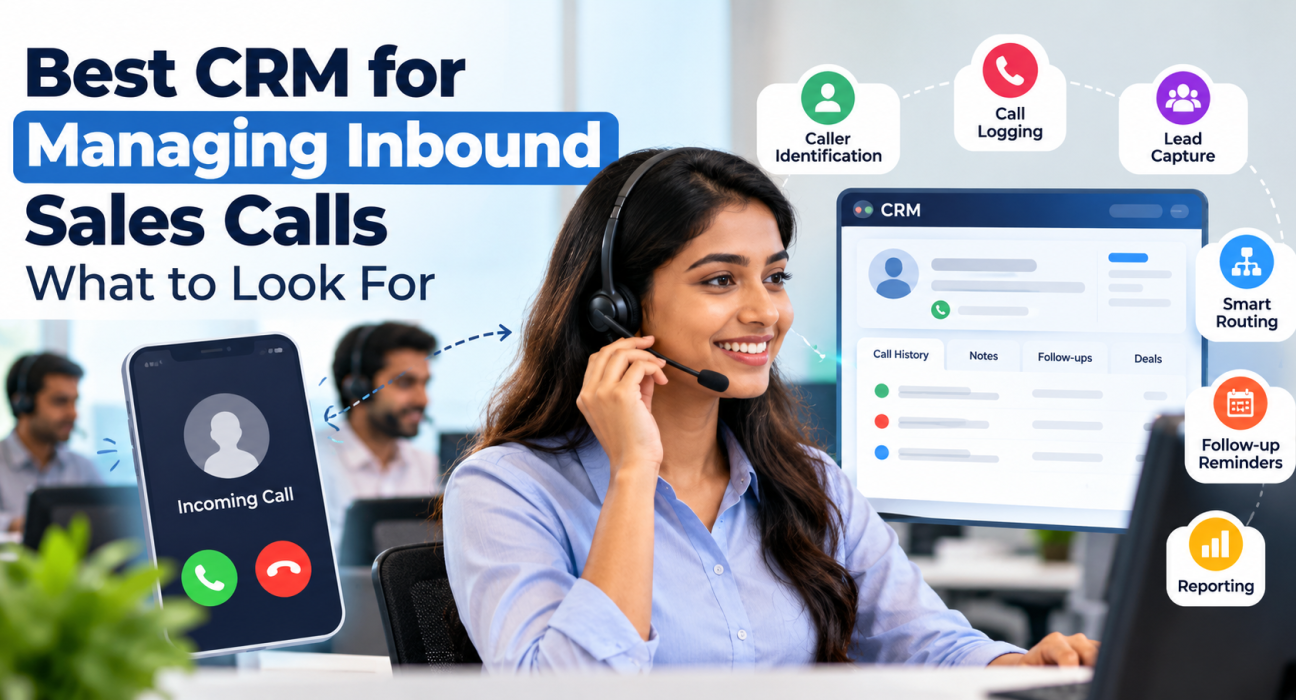
Features to Look for in an Inbound Call CRM
1. Caller identification and context
When a known customer calls, the agent should see their name, past conversations, notes and current stage before saying hello. This avoids repeated questions and makes the business look organised. Check whether the CRM shows this on the phone the agent actually uses.
2. Automatic call logging and recording
Every call should be logged with duration and outcome without manual typing. Recording helps with training and disputes, but it must be stored securely and used in line with your consent and privacy obligations. Ask how long recordings are retained and who can listen to them.
3. Lead capture from every source
Inbound calls are only part of the picture. The same customer may also fill a Facebook form, enquire on a portal or submit your website form. Your CRM should bring all of these into one pipeline and remove duplicates, so a caller is not treated as a new lead each time.
4. Smart routing and assignment
Leads should go to the right agent by rules such as round-robin, language or a fixed owner. Good routing also considers who is on shift. Otherwise a lead may be assigned to someone who is on leave.
5. Follow-up reminders
Many inbound enquiries need two or three conversations before they close. The CRM should let agents set a callback in one tap and flag overdue follow-ups to both agent and manager.
6. Pipeline stages and reporting
You should be able to see how many enquiries are new, contacted, interested or closed, and which source or agent performs best. Reports on response time and missed follow-ups are more useful than total call counts alone.
Inbound vs Outbound: Why the Needs Differ
| Factor | Inbound calls | Outbound calls |
|---|---|---|
| Who starts the call | The customer | The agent |
| Biggest risk | Missed or late response | Low connect rates |
| Key CRM need | Caller context and fast routing | Dialer and call queues |
| Customer intent | Usually higher | Varies widely |
| Main metric | Response time and follow-up rate | Calls per day and connect rate |
Some CRMs are built mainly for outbound calling, and some for service desks. Check which side a product leans towards before you decide.
How to Set Up Inbound Call Management in 6 Steps
- List your inbound sources. Include direct calls, missed calls, IVR numbers, portals, ads and website forms.
- Define your pipeline stages. Keep them simple, for example New, Contacted, Interested, Won and Lost.
- Set assignment rules. Decide who handles which leads by language, product or region.
- Create a call outcome list. Agents should pick from fixed options such as Interested, Call Back or Not Relevant.
- Set a follow-up rule. For example, every interested lead gets a callback date before the call ends.
- Review weekly. Look at response time, overdue follow-ups and lead source quality.
Example Scenarios (Hypothetical)
These are illustrative examples, not customer case studies.
Real estate: A buyer calls after seeing a property listing. If the CRM shows that the same number enquired on a portal two days ago, the agent can continue that conversation. The agent then sets a site-visit follow-up before ending the call.
Education: A parent calls a coaching centre about admissions. The counsellor logs the course and batch interest, and the CRM reminds the team to call back after the fee structure is shared.
Common Mistakes to Avoid
- Buying a feature-heavy CRM that agents find too complicated.
- Skipping the outcome and next-step fields after calls.
- Having no rule for who owns a lead that calls back.
- Not importing old leads, so repeat callers appear as new.
- Tracking calls but not follow-ups, which is where deals are usually lost.
How TeleCallingCRM Can Help With Inbound Sales Calls
TeleCallingCRM is a telecalling CRM built for Indian sales teams. Based on its website and documentation, these capabilities are relevant to inbound work:
- Caller context: According to its mobile app guide, caller ID can show CRM context as a popup or full-screen when a known lead rings in.
- Lead capture: Leads from sources such as Facebook and Instagram Lead Ads, JustDial, IndiaMART and property portals can flow in through lead integrations. These leads are de-duplicated and routed.
- Routing: Assignment rules support round-robin, language-based and fixed-agent assignment, and consider whether agents are available.
- Follow-ups: Callbacks, reminders and overdue alerts are built in.
- Records: Calls can be recorded and stored encrypted, with call history, notes and source visible on each lead.
- Visibility: A live War Room shows agent activity and performance in real time.
An honest note on fit: TeleCallingCRM is positioned mainly around telecalling and lead management. Its website does not describe a hosted virtual number or a full inbound call queue. If you need those, ask in a demo how inbound calls reach your agents, or check whether your existing telephony or IVR provider can connect through webhooks. Its call centre page lists Sarv IVR and webhooks as lead sources.
For a broader comparison framework, see our guide on how to choose the best telecalling CRM.
Frequently Asked Questions
What is the best CRM for inbound sales calls?
There is no single best option for every business. Choose one that shows caller history, routes leads to the right agent, logs calls automatically and tracks follow-ups. Run a trial with your real team and lead sources before you commit.
What is the difference between an inbound call CRM and a call centre system?
An inbound call CRM focuses on managing leads and sales follow-up. A call centre system focuses on handling call volume through queues, IVR and agent distribution. Some businesses use both, connected together.
Can a CRM track missed calls?
It depends on the setup. Some CRMs log missed calls through the phone’s call log or a telephony integration. Ask the vendor exactly how missed calls are captured and whether they create a follow-up task.
Do small businesses need a CRM for inbound calls?
If you get more than a handful of enquiries a week, a CRM usually helps. It prevents leads from being forgotten and gives you a record when staff change. A simple tool is enough at the start.
How much does an inbound call CRM cost?
Prices vary. Some tools charge per user per month, while others offer flat plans by team size. Compare the total cost for your team, including any add-ons. TeleCallingCRM lists its current plans on its pricing page.
Is call recording legal in India?
Rules around recording and consent depend on your use case and applicable laws. It is good practice to inform callers that calls may be recorded, and to store recordings securely. Check with a legal adviser for your business.
How do I stop duplicate leads when a customer calls again?
Use a CRM that matches phone numbers and merges or flags duplicates. Importing your existing contact list first also helps the system recognise returning callers.
Conclusion
Managing inbound sales calls well comes down to a few habits: know who is calling, assign the lead quickly, log what was said and follow up on time. The right CRM makes these habits easy for your team to keep.
Start by listing your lead sources and the gaps in your current process. Then test two or three tools with real data. If you want to see how lead follow-up software works for your team, you can ask for a demo and bring your inbound questions.