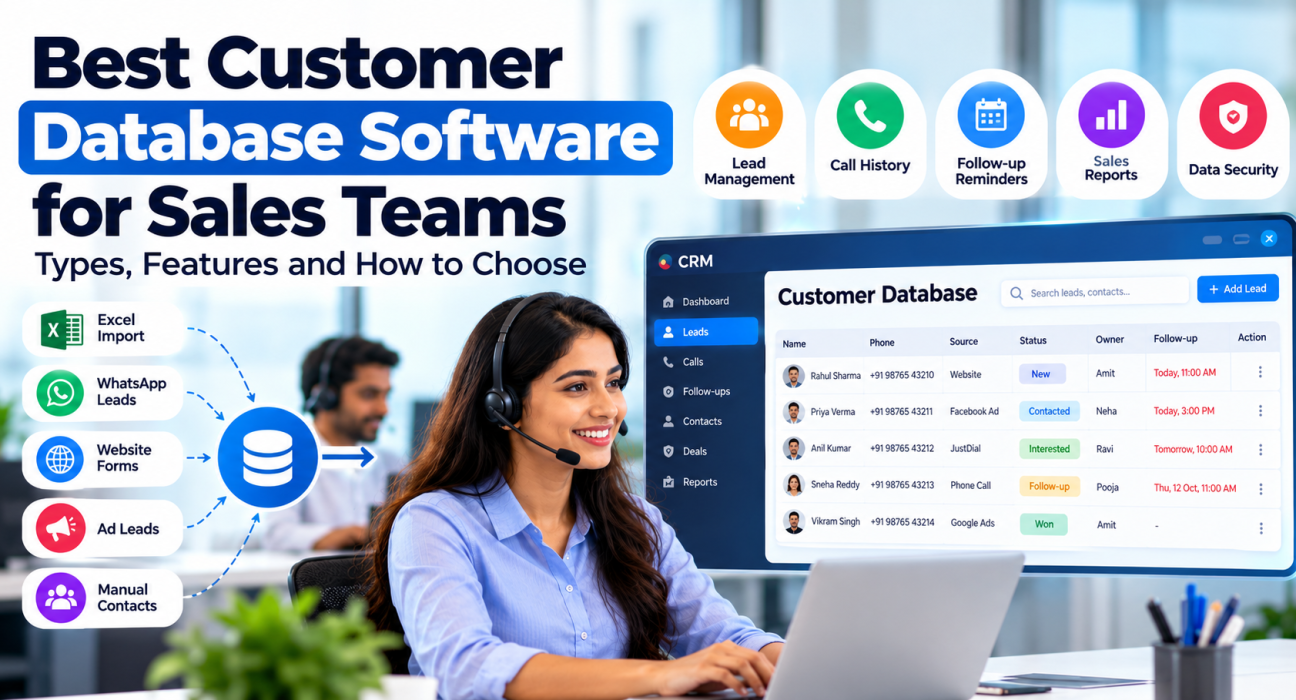
Best Customer Database Software for Sales Teams: Types, Features and How to Choose
Sales teams often lose leads for a reason that has nothing to do with selling skill. Customer details are scattered across Excel sheets, WhatsApp chats, personal phone contacts and someone’s notebook. Two agents call the same person, a promised callback is forgotten, and when a team member leaves, their contacts leave with them.
Customer database software is meant to fix this. For teams that sell mainly over the phone, the most useful kind is a customer database with built-in lead management, where every call, note and follow-up is recorded against the right person.
This guide covers the main types, the features that matter and how to move out of spreadsheets.
Quick answer: which type is best for a sales team?
The best customer database software for a sales team is the one built around how that team sells. Phone-led teams are usually best served by a telecalling CRM, email- and meeting-led B2B teams by a general-purpose CRM, very small teams by a well-kept spreadsheet, and large multi-department organisations by an enterprise CRM.
What is customer database software?
Customer database software is a tool that stores the details and interaction history of every lead and customer in one shared, searchable place. For a sales team, each record shows who the person is, where the lead came from, who owns it and every interaction so far.
It works as a loop: a lead comes in and gets one owner, each call and note is saved to its record, and a next follow-up date is set. Anyone opening the record can see what has happened and what comes next.
Customer database vs CRM: what is the difference?
A customer database stores records. A CRM (customer relationship management) system is a customer database plus the tools to act on those records, such as pipelines, reminders, lead assignment and reports.
Every CRM has a customer database inside it, but a customer database on its own is not a CRM. Lead management software, telecalling software and lead follow-up software are usually CRMs with a narrower focus. Sales teams usually need a CRM, because storing a number is not the same as remembering to call it.
Types of customer database software compared
There are five broad options. Each suits a different stage and style of selling.
| Type | Common examples | Best suited for | Main limitation |
|---|---|---|---|
| Spreadsheets | Microsoft Excel, Google Sheets | One or two people with a small contact list | No automatic call history or reminders, limited access control; duplicates build up quickly |
| No-code database tools | Airtable | Teams that want a custom structure without a full CRM | Takes time to set up; no built-in calling workflow |
| General-purpose CRMs | HubSpot, Zoho CRM, Pipedrive | B2B teams that sell through emails, meetings and proposals | Usually designed around deals and email; high-volume calling may need extra setup |
| Telecalling CRMs | TeleCallingCRM, TeleCRM, NeoDove | Teams that spend most of the day calling leads | Built around outbound calling, so less suited to teams that rarely call |
| Enterprise CRMs and customer data platforms | Salesforce | Large organisations where several departments share customer data | Higher cost and more administration |
If you have outgrown spreadsheets, the practical choice is usually between a general-purpose CRM and a telecalling CRM.
Features sales teams should look for
Use this checklist when you compare tools.
- One record per person. Duplicates should be caught at import and when new enquiries arrive, so two agents never work the same lead.
- Easy import from Excel or CSV. You should be able to map your existing columns to fields without rebuilding the sheet.
- Automatic lead capture. Enquiries from ads, portals and website forms should enter the database directly, not through a daily copy-paste.
- Complete history on each record. Calls, notes, messages and status changes should sit together in one timeline.
- A follow-up date on every open lead. Reminders and overdue alerts stop a promised callback from being forgotten.
- Custom fields that match what you sell. Budget and location for property, course and intake for education, policy type and renewal date for insurance.
- Clear ownership and access control. Every record needs one owner, and agents should see only what their role allows.
- Search, filters and export. You should be able to pull a list such as “interested, not called in seven days” in seconds, and take your data out when you need it.
- Mobile access. If agents work from their phones, the database must be usable there.
How to choose based on the way your team sells
Answer three questions before you shortlist any tool.
- Where does most of your selling happen? If agents spend the day on calls and results depend on timely callbacks, pick telecalling software where the dialer, call log and follow-up reminder are part of the customer record. Our guide on how to choose a telecalling CRM covers that evaluation in detail. If deals move through proposals, meetings and several decision-makers, a general-purpose CRM is usually the better fit.
- How do leads reach you? Daily enquiries from ads and portals call for automatic capture and duplicate checks. A fixed list mainly needs a clean import.
- Who will use it, and at what cost? Decide what each role should see, then work out the yearly cost at the team size you expect.
Two hypothetical examples show how this plays out.
Real estate. A brokerage with six agents receives enquiries from property portals and social media ads, and the same buyer often enquires twice. The team needs de-duplication, fields for budget, configuration and preferred location, and stages for site visits. A calling-focused real estate CRM fits this better than a general contact list.
Education. A coaching institute gets a rush of enquiries before each intake. Counsellors need to see which course a student asked about, who spoke to the parent last and when the next call is due. An education CRM built around counselling follow-ups suits this pattern.
How to move from Excel to a customer database
A messy sheet uploaded as it is becomes a messy database. Follow these steps instead.
- Decide your fields. List what agents really use on a call, and drop columns nobody fills.
- Clean the sheet. Keep one row per person, use one phone number format, and delete duplicates and dead numbers.
- Agree on statuses. Define a short set of stages, such as New, Contacted, Interested, Follow-up, Converted and Lost.
- Import a small batch first. Check that columns map correctly before uploading everything.
- Connect your lead sources. New enquiries should stop arriving in Excel from the first day.
- Set roles and ownership. Decide who can view, edit, transfer and export records.
- Fix one rule. Every call ends with an outcome and a next follow-up date.
- Review weekly. Make one person responsible for checking unassigned leads, overdue follow-ups and duplicates.
Common mistakes to avoid
- Choosing by feature count instead of how the team sells.
- Making too many fields compulsory, so agents type anything just to move ahead.
- Letting agents keep parallel lists on personal phones or WhatsApp.
- Giving every agent the right to export the full list.
- Not checking how to take your data out if you switch later.
Data protection and calling rules in India
A customer database holds personal data, so the law applies to it.
Under the Digital Personal Data Protection Act, 2023, the business that decides why and how personal data is processed is the Data Fiduciary and is accountable for its use. The DPDP Rules were notified in November 2025 with an eighteen-month phased compliance period. According to the government’s explainer on the DPDP Rules, individuals can ask to access, correct and, in certain situations, erase their data, and such requests must be addressed within ninety days. Your software should let you find, correct and delete a person’s record quickly.
TRAI regulates commercial calls and messages separately. According to TRAI’s September 2026 press note on its amended regulations, commercial communication based on a customer’s own enquiry may be sent only for seven days from that enquiry. The enquiry must be made in writing or digitally, and the sender must keep it in a verifiable form. Other promotional outreach depends on the customer’s registered preferences and consent.
So record the enquiry date, source and consent on every lead, and check the regulations for when each change takes effect. This is general information, not legal advice.
Where TeleCallingCRM fits
TeleCallingCRM is a telecalling CRM for teams that sell by phone. As a customer database, it offers:
- Bulk import from Excel or CSV with automatic de-duplication. The import wizard maps your columns to lead fields, including custom fields.
- Lead capture from 12+ sources, including Facebook and Instagram Lead Ads, Google Ads, 99acres, Housing.com, MagicBricks and JustDial.
- Call history, notes and source on every lead, with follow-up reminders and overdue alerts.
- Role-based permissions, so a role can view all leads or only its own.
- Android and iOS apps for agents.
- Encryption at rest and in transit, configurable data retention, and a Do-Not-Call list that the dialer skips.
Pricing is a flat monthly fee per plan rather than per user. At the time of writing, plans start at ₹999 per month for up to five users, excluding GST, with a 3-day free trial.
It is built for calling teams. If your sales are mostly email-led, a general-purpose CRM may suit you better.
Frequently asked questions
What are the benefits of customer database software for a sales team?
The main benefits are fewer duplicate calls, fewer forgotten follow-ups and continuity when an agent leaves, because the history stays with the business. Managers can also see which lead sources and agents convert. These benefits appear only when agents update the record after every call.
Is Excel good enough as a customer database?
Excel or Google Sheets works for one or two people with a small list. It becomes risky when several agents share the file, because there is no automatic call history, no follow-up reminder and only limited access control. Duplicate entries and overwritten data are the usual warning signs.
What information should a sales customer database store?
At minimum: name, phone number, lead source, enquiry date, assigned owner, current status, call history, notes and next follow-up date. Add a few fields specific to what you sell, such as budget, course or policy type. Avoid collecting personal details you will not use.
How much does customer database software cost?
Spreadsheets cost little or nothing, and several CRMs offer free plans with limits on users or records. Paid tools are usually priced per user per month, so the bill grows with the team. A few, including TeleCallingCRM, charge a flat fee per plan. Compare the yearly cost at your expected team size.
Is it safe to keep customer data in cloud-based software?
It can be, if the provider encrypts data, offers role-based access and lets you export or delete records. Ask where data is stored, who can access it and how backups work. Your business remains responsible for how customer data is used, whichever tool you choose.
Conclusion
Good customer database software gives every lead one record, one owner and one next step. The type you choose should follow how your team sells, not the longest feature list.
Whatever you pick, clean your data first, keep the fields few and insist on a follow-up date after every call. If most of your selling happens on calls, a purpose-built CRM for telecallers is worth a short trial with your own leads before you decide.