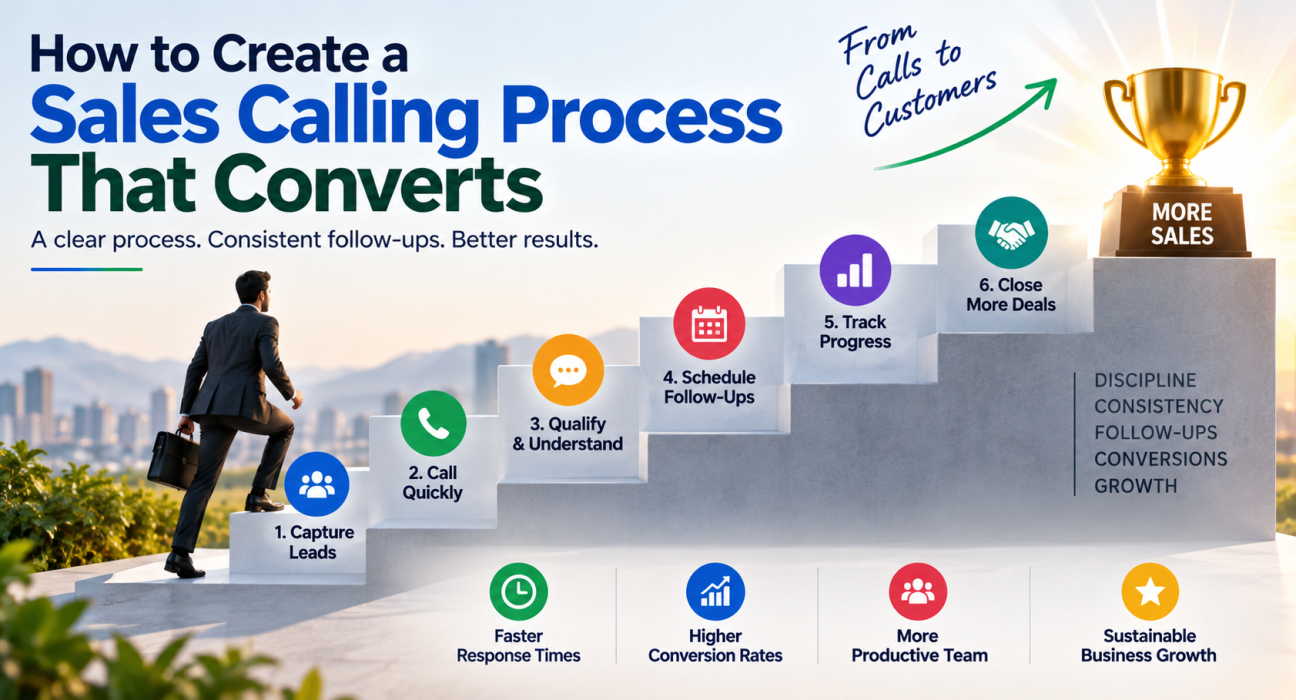
How to Create a Sales Calling Process That Converts
Most sales teams don’t lose deals because their product is weak. They lose deals because their calling process is disorganised — leads sit untouched for hours, telecallers forget follow-ups, and every telecaller works from a different script with a different level of discipline.
A sales calling process fixes this. It is a repeatable sequence of steps your team follows from the moment a lead arrives to the moment it is won or lost. When this process is missing, teams end up relying on individual memory and effort, which rarely scales. Businesses trying to build this kind of structure often start by putting a proper sales calling software in place, since a process is only as reliable as the system that supports it.
This guide breaks down exactly how to build a sales calling process that converts — step by step, with practical examples from real business situations.
What Is a Sales Calling Process?
A sales calling process is a defined set of stages a lead moves through during outbound calling — from first contact to a won or lost outcome — with clear rules for follow-up timing, call scripts, and lead status at each stage.
Unlike ad-hoc calling, where telecallers decide what to do next on their own, a proper process removes guesswork. Everyone on the team knows what to say, when to call back, and how to tag a lead after every conversation.
Why Most Sales Calling Efforts Fail to Convert
Before building a better process, it helps to understand where the current one usually breaks down. These problems repeat across industries — real estate, education, insurance, finance, and B2B sales all report similar patterns.
- Telecallers contact leads too late. A lead that submits an enquiry and doesn’t receive a call within minutes cools down fast.
- Telecallers forget follow-ups. Without reminders, they rely on memory or sticky notes, and leads slip through.
- Nobody prioritises leads. Hot leads and cold leads get the same attention, wasting time on prospects unlikely to convert soon.
- Telecallers don’t record call outcomes properly. If a call’s result stays unlogged, the next follow-up has no context, and the conversation starts from zero again.
- Managers lack visibility. Without reports on call volume, connect rate, or pending follow-ups, problems stay hidden until deals are already lost.
Each of these is a process gap, not a skill gap. Fixing the process usually improves conversions faster than retraining the team.
Step 1: Define Clear Lead Stages
Every lead should sit in a defined stage that reflects where it actually is in the buying journey. A simple, workable stage structure looks like this:
| Stage | Meaning |
|---|---|
| New | Lead just came in, not yet contacted |
| Contacted | Telecaller made the first call, awaiting response or decision |
| Interested | Lead has shown genuine interest, needs follow-up |
| Negotiation | Discussing pricing, terms, or final details |
| Won | Lead has converted into a customer |
| Lost | Lead has declined or gone cold |
Keeping stages simple avoids confusion. Telecallers should be able to update a lead’s stage in one tap after every call, rather than filling out long forms.
Step 2: Set a First-Contact Time Standard
Speed to first contact is one of the biggest factors in whether a lead converts at all. A lead that fills a form on a property listing site or requests a demo is often speaking to two or three competitors at the same time.
Set an internal standard, such as calling every new lead within 5 to 15 minutes during working hours. This is realistic when leads from sources like Facebook Lead Ads, Google Ads, or your website land directly in a system that assigns them automatically, instead of sitting in someone’s inbox waiting for a manual export.
Direct answer: First-contact speed matters because interest peaks right after a lead submits an enquiry. The longer the delay, the lower the chance of a genuine, engaged conversation.
Step 3: Build a Simple, Flexible Call Script
A script should guide the conversation, not make the telecaller sound robotic. A good structure covers:
- Opening — Introduce yourself, the company, and the reason for the call.
- Discovery — Ask about the lead’s requirement, timeline, and budget range.
- Value statement — Explain how your product or service fits their specific need.
- Objection handling — Address common hesitations (price, timing, trust).
- Next step — Confirm a follow-up call, demo, or document to be shared.
Scripts should differ by industry. A real estate telecaller asking about budget and location needs a different flow than an education counsellor asking about course preference and admission timeline. Teams that use CRM for telecallers with stage-aware scripts can keep the right script visible on the call screen automatically, based on which stage the lead is in.
Step 4: Design a Follow-Up Cadence
Telecallers rarely close a sale on the first call. Industry patterns across insurance, real estate, and B2B sales consistently show that a lead usually needs multiple touchpoints before committing.
A basic follow-up cadence:
- Day 0: First call after lead capture
- Day 1–2: Follow-up call if no decision was made
- Day 4–5: Send relevant information (pricing, brochure) via WhatsApp or email
- Day 7: Follow-up call to check status
- Day 14: Final follow-up before marking as cold, unless the lead has shown clear intent
This cadence should adjust based on lead priority. A hot lead might need a follow-up the same day, while a cold lead can wait a week. Manually tracking this across dozens or hundreds of leads is where most teams struggle — which is why lead follow-up software with automatic reminders and overdue alerts is often the difference between a plan that exists on paper and one the team actually follows.
Step 5: Assign Leads the Right Way
Lead assignment decides who calls whom, and getting this wrong wastes both leads and telecaller time. Common assignment methods include:
- Round-robin: The system distributes leads evenly across available telecallers.
- Language or region match: A Hindi-speaking lead goes to a Hindi-speaking telecaller.
- Fixed ownership: Repeat enquiries or existing customers go back to the same person they spoke with before.
Whichever method a team uses, it should only assign leads to telecallers who are actually available. Assigning a lead to someone on leave or not logged in delays the first call and defeats the purpose of a fast response.
Step 6: Track Calls and Outcomes Consistently
Every call needs a recorded outcome — connected, not answered, busy, callback requested, not interested, and so on. This single habit does two things:
- It gives the next telecaller (or the same one, days later) full context before dialling again.
- It gives managers real numbers on connect rate, call volume, and where leads are dropping off.
Without consistent call logging, a manager cannot tell whether a low conversion rate is due to poor lead quality, weak follow-up, or a script problem. With it, the data points to the actual issue.
Step 7: Monitor Performance and Adjust
A sales calling process isn’t something you set up once and leave alone. It needs regular review using a few core metrics:
- Connect rate: Percentage of calls that actually reach the lead
- Follow-up completion rate: Percentage of scheduled follow-ups that were actually made
- Conversion rate by source: Which lead sources produce the most won deals
- Average time to first contact: How quickly new leads are being called
Reviewing these weekly, rather than only at month-end, makes it possible to fix problems — like a telecaller missing follow-ups or a lead source with poor quality — before they affect the whole month’s numbers.
Real-World Example: A Small Real Estate Team
Consider a hypothetical example. A real estate business with six telecallers receives leads from property portals, Facebook ads, and its own website. Before setting up a process, leads sat in a shared Excel sheet, and telecallers picked leads to call based on personal judgement.
After introducing a defined process — stage tracking, a 15-minute first-contact target, and automated follow-up reminders — the same team could see exactly which leads were overdue for a callback and which sources were converting best. This is a common pattern across teams that move from spreadsheets to a structured system, and it illustrates why process design matters more than simply calling more numbers.
Common Mistakes to Avoid
- Skipping lead stages and treating every lead the same, regardless of interest level.
- Relying on memory for follow-ups instead of reminders or alerts.
- Ignoring the DNC (Do Not Call) list, which risks compliance issues.
- Overloading telecallers with too many leads to call in a day, leading to rushed, low-quality conversations.
- Never reviewing data, so the same mistakes repeat month after month.
How TeleCalling CRM Supports a Sales Calling Process
A defined process is only useful if the day-to-day tools make it easy to follow. TeleCalling CRM brings lead capture, calling, follow-up scheduling, and reporting into a single system built for this kind of workflow.
- The system automatically captures leads from sources like Facebook & Instagram Lead Ads, Google Ads, 99acres, Housing, MagicBricks, JustDial, and Google Sheets, so the first-contact clock starts sooner.
- An auto dialer helps telecallers move through assigned leads without manual dialling, logging call duration and outcome automatically.
- Follow-up scheduling includes reminders and overdue alerts, so a promised callback doesn’t quietly disappear.
- A real-time dashboard shows connect rate, call volume, and pipeline stage, giving managers the visibility needed to adjust the process when something isn’t working.
The article’s advice applies whether or not a business uses this particular system — a disciplined calling process built around clear stages, timely follow-up, and honest tracking will improve conversions on any platform.
FAQs
What is a sales calling process?
A sales calling process is a repeatable sequence of steps — from first contact to a won or lost outcome — that shows the team how to call, follow up with, and track leads, so every telecaller works to the same standard instead of relying on individual judgement.
How quickly should a new lead be called?
Ideally within 5 to 15 minutes of capturing the lead, during working hours. Interest is highest right after someone submits an enquiry, and delays reduce the chance of a genuine conversation.
How many follow-up calls are usually needed to convert a lead?
This varies by industry and lead quality, but telecallers rarely close a sale on the first call. A structured follow-up cadence over one to two weeks, adjusted by lead priority, generally performs better than a single attempt.
What should a telecaller track after every sales call?
At minimum, the call outcome (connected, not answered, interested, not interested), any notes from the conversation, and the next follow-up date. This context is essential for whoever calls the lead next.
Do small businesses need a formal calling process, or is it only for large teams?
Even a two- or three-person telecalling team benefits from a basic process. It becomes essential once a team grows past a handful of telecallers, since informal tracking (like a shared spreadsheet) breaks down quickly with lead volume.
Can a sales calling process work without CRM software?
Yes, on a small scale, with a spreadsheet and strict manual discipline. However, manually managing follow-up reminders, lead assignment, and reporting gets difficult once lead volume grows, which is where telecalling software helps.
What’s the difference between a sales calling process and a call script?
A call script covers what to say during a single conversation. A sales calling process covers the entire lifecycle of a lead — stages, timing, assignment, follow-up, and tracking — of which the script is just one part.
Conclusion
Converting more leads through outbound calling rarely comes down to hiring better talkers. It comes down to building a process that removes guesswork — clear lead stages, fast first contact, a consistent follow-up cadence, and honest tracking of what’s working and what isn’t.
Once this structure is in place, the next practical step is choosing a system that can actually run it day to day, rather than trying to manage it through spreadsheets and reminders on paper. Many teams find that a dedicated telecaller CRM makes it far easier to stick to the process once they’ve designed it, since assignment, reminders, and reporting all happen automatically instead of depending on someone remembering to do them.