WhatsApp CRM: How to Manage Leads and Sales Conversations
Most sales teams in India already run on WhatsApp. Enquiries arrive there, teams share quotations there, and follow-ups happen there. The problem starts when those conversations sit only inside individual phones. A telecaller replies to a lead at 9 PM, forgets to note it, and the next day nobody remembers the promise.
This is why businesses move from personal chats to a WhatsApp CRM — a system that attaches every message to a lead record instead of a phone. Teams that already run outbound calling usually get the most value from a CRM with WhatsApp messaging built in, because calls and chats then sit on the same timeline.
What Is a WhatsApp CRM?
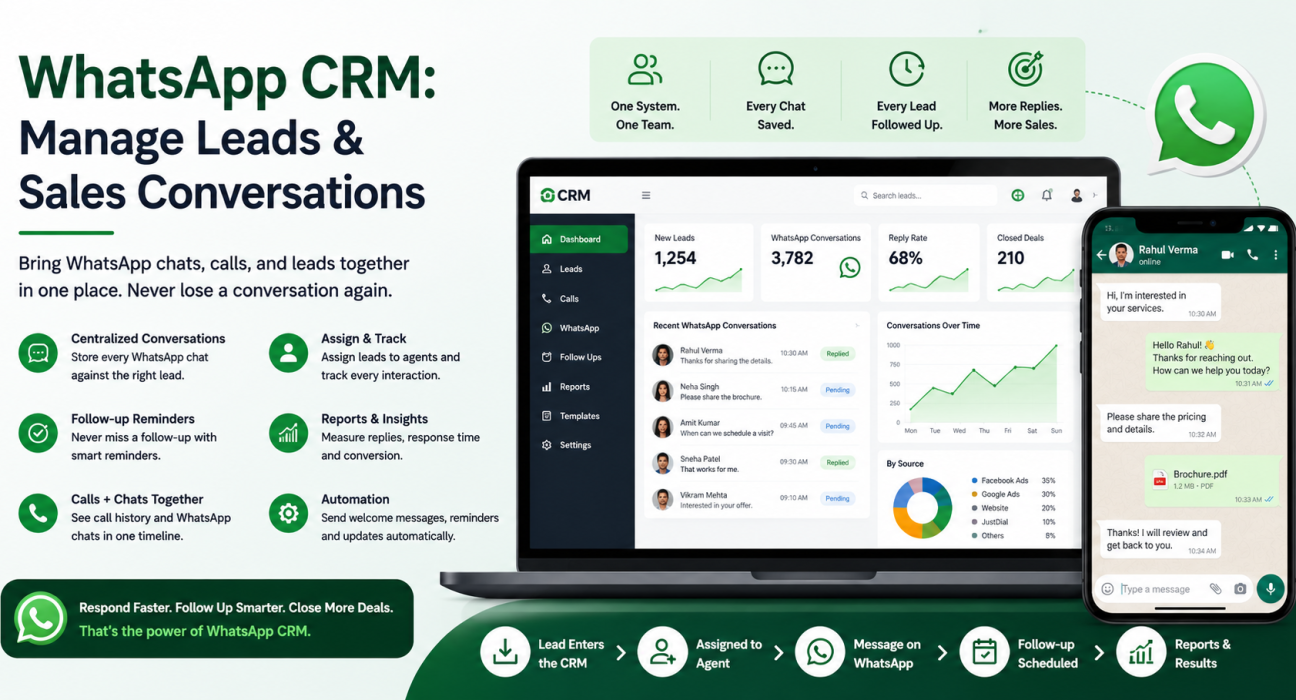
A WhatsApp CRM is a customer relationship management system that connects WhatsApp to your lead database, so it keeps every chat on the lead record along with call history, notes, follow-up dates and pipeline stage. It lets a sales team message leads, track replies and assign ownership from one place instead of separate personal phones.
The key difference from plain WhatsApp is ownership and memory. In WhatsApp, a conversation belongs to a device. In a CRM, it belongs to a lead — so it survives agent absence, leave and resignation.
Why WhatsApp Alone Is Not Enough for Sales Teams
The WhatsApp Business app works well for a single owner handling a handful of enquiries. It starts to break the moment a team shares the work:
- No shared visibility. A manager cannot see which leads got a message and which ones nobody touched.
- Data leaves with the agent. When a telecaller resigns, the chat history goes with the phone.
- No follow-up discipline. WhatsApp has no concept of “call this lead again on Thursday”.
- No connection to calls. The call happened on the dialer, the quotation went on WhatsApp, and neither knows about the other.
- No reporting. You cannot measure response time, reply rate or conversion by source.
A CRM does not replace WhatsApp. It gives WhatsApp a memory and an owner.
How a WhatsApp CRM Works
The mechanics are simple once you see the sequence:
- Leads enter the CRM from ad forms, portals, websites, calls or a CSV upload.
- The system assigns each lead to a telecaller automatically, using rules such as round-robin, language or availability.
- The agent calls or messages the lead from inside the CRM.
- The CRM logs that WhatsApp message on the lead record, so the next person sees the full history.
- The agent sets a follow-up based on the outcome of the conversation.
- Automations handle the routine — a welcome message on a new lead, a reminder before a site visit, a nudge when a follow-up falls due.
- Reports show what happened — replies, missed follow-ups, stage movement, closures.
Two Ways to Connect WhatsApp
| Method | How it works | Suits |
|---|---|---|
| Agent’s own WhatsApp number | The CRM opens WhatsApp with a pre-written template for that lead, and the agent sends it | Small teams, personal one-to-one selling, low message volume |
| WhatsApp Business Platform (API) | The system sends and receives messages programmatically through an approved business number | Higher volume, automated notifications, shared team inbox |
Neither approach wins automatically. One-tap templates from an agent’s number are simpler to start with and feel personal. The API route suits businesses that need automated, high-volume messaging and a single verified business identity.
WhatsApp Rules You Should Know Before You Start
If you plan to use the WhatsApp Business Platform, three rules shape almost every decision. These come from Meta’s official documentation, not from vendor marketing.
- The 24-hour customer service window. When a customer messages your business, a 24-hour window opens. Inside that window you can reply with normal free-form messages.
- Templates outside the window. Outside a customer service window, only an approved message template can reach a WhatsApp user. Templates fall into three categories — marketing, utility and authentication — and Meta reviews each one before you can use it.
- Per-message pricing. Meta moved to per-message pricing on 1 July 2025. Non-template messages inside an open service window cost nothing, while marketing templates carry a charge.
The practical takeaway: speed is not just good service, it is cheaper. If your team replies inside the 24-hour window, most of that conversation costs nothing. If you let leads go cold and then re-open them with marketing templates weeks later, you pay twice — in money and in conversion.
A Practical Workflow for Managing Leads on WhatsApp
This workflow works for most Indian sales teams running a mix of calls and chats.
- Capture every enquiry in the CRM first, not in a phone. Ad leads, portal leads and website forms should land in one place and carry a source tag.
- Assign within minutes. Unassigned leads are the single biggest leak. Use automatic assignment rather than a WhatsApp group.
- Call first, message second. A call establishes context; the WhatsApp message then carries the detail — price list, brochure, location pin.
- Send one useful message, not five. Combine the details into a single clear message with a specific next step.
- Set the follow-up before ending the conversation. Every call outcome should create a dated reminder.
- Log outcomes in structured fields, not only in free text. Interested, budget mismatch, wrong number and callback later should all be selectable statuses, so your reports mean something.
- Review overdue follow-ups daily. A short daily check of the overdue list rescues most deals before they slip away.
Realistic Examples
These are illustrative scenarios, not customer case studies.
- Real estate: A portal enquiry arrives at 10 PM. An automated acknowledgement goes out immediately, the CRM routes the lead to the agent handling that project, and the agent gets a callback reminder for 10 AM. The agent shares the site-visit location on WhatsApp, and the CRM keeps it on the lead’s timeline.
- Education: During admission season, a counsellor calls an enquiry, sends the fee structure on WhatsApp, and sets a follow-up for the day after the entrance results. The next counsellor on duty can see all of it.
- Insurance: A renewal reminder goes out as a utility message a fortnight before the due date, and the telecaller calls only those customers who did not respond.
Benefits of Using a WhatsApp CRM
- Faster first response, which matters most in the first few minutes after an enquiry.
- No lost history when an agent takes leave or leaves the company.
- Fewer missed follow-ups, because reminders live in the system and not in memory.
- Clear accountability — every lead has one owner and a visible last activity.
- Better reporting on source quality, response time and conversion.
Common Mistakes to Avoid
- Running the team from a WhatsApp group. Groups suit coordination, not lead ownership.
- Using personal numbers for business chats. You lose the data and the customer loses trust.
- Broadcasting to people who never opted in. This damages your quality rating and your brand.
- Treating WhatsApp as a replacement for calling. For considered purchases — property, loans, education, insurance — the call still closes the deal.
- Skipping the disposition step. If nobody records outcomes, no report will ever mean anything.
What to Look For When Choosing a WhatsApp CRM
Use this as a shortlist checklist:
- Does the CRM log WhatsApp activity on the lead record automatically?
- Can it assign leads by rule instead of manually?
- Does it schedule follow-ups and surface them in daily views?
- Does one timeline cover calls, WhatsApp, SMS and email?
- Can non-technical staff build automations without a developer?
- Does the mobile app work for field agents?
- Does the pricing stay predictable as the team grows?
If your team’s core activity is outbound calling and WhatsApp plays the supporting role, a calling-first CRM usually fits better than a chat-only tool. Our guide on how to choose the best telecalling CRM for your business covers the evaluation process in more detail.
How TeleCallingCRM Supports WhatsApp Conversations
TeleCallingCRM serves outbound calling teams, and it keeps WhatsApp inside the same workflow rather than in a separate app. Relevant capabilities include:
- Unified inbox that keeps SMS, email and WhatsApp on one lead timeline.
- WhatsApp templates that an agent can send to a lead in one tap, with per-lead personalisation.
- Lead management and auto-distribution, including bulk import with deduplication and rule-based assignment.
- Follow-ups and smart reminders, with Today, Overdue and Upcoming views plus overdue alerts.
- No-code automation workflows that trigger WhatsApp, SMS or email actions on events such as a new lead or a stage change.
- Industry-specific setups for sectors like real estate, education, insurance and financial services.
Pricing stays flat monthly rather than per user, and the pricing page lists the current plans. Whether you choose TeleCallingCRM or another tool, the principle stays the same: the conversation must belong to the lead record, not to a phone.
Frequently Asked Questions
What is a WhatsApp CRM?
A WhatsApp CRM is a CRM that connects WhatsApp to your lead database, so chats, calls, notes and follow-ups sit on one lead record. It gives sales teams shared visibility, clear lead ownership and reporting, which plain WhatsApp cannot offer on its own.
Can WhatsApp Business be used as a CRM?
For a solo owner with limited enquiries, the WhatsApp Business app often does the job. A team will outgrow it quickly: it has no lead assignment, no follow-up scheduling, no shared history and no reporting. Most teams feel that limit within a few months.
Do I need the WhatsApp Business API to use a WhatsApp CRM?
Not always. Many CRMs let agents send pre-written templates from their own WhatsApp number in one tap, which suits small teams. The API becomes necessary when you need automated messaging at volume, a shared team inbox or a single verified business number.
How much does WhatsApp business messaging cost?
Meta charges per message on the WhatsApp Business Platform. Messages you send inside an open 24-hour customer service window cost nothing, while marketing templates carry a charge. Rates vary by country and category, so check Meta’s current pricing documentation.
What is the 24-hour window in WhatsApp?
When a customer sends your business a message, a 24-hour customer service window opens. Within it you can reply with normal messages. After it closes, you can only reach that user with an approved message template.
Should telecallers use WhatsApp or phone calls?
Both, in sequence. Calls work better for qualification and closing, especially for high-value purchases. WhatsApp works better for sharing documents, confirmations and reminders, and for leads who cannot take calls during work hours.
How do I stop losing leads on WhatsApp?
Capture every enquiry in the CRM, assign it automatically, set a dated follow-up after every conversation, and review the overdue list daily. Most WhatsApp lead loss comes down to a follow-up problem, not a messaging problem.
Conclusion
WhatsApp is where Indian buyers reply fastest, but it never set out to manage a sales pipeline. The fix is not to message less — it is to make sure every conversation sits on a lead record, carries one owner’s name, and ends with a dated next step.
Start small: bring all leads into one system, assign them automatically, and make follow-ups visible. Once that habit settles in, WhatsApp templates and automations multiply the effect. If your team runs on outbound calling, a telecalling CRM that keeps calls and WhatsApp on the same lead record is usually the most practical starting point.